Appointment reminder texts you pay for once.
Pick the times. The agent reads your calendar and texts each customer, once per time.
How do appointment reminder texts work with no monthly fee?
Your Speakvora agent reads your Google or Outlook calendar and texts each customer at the times you choose, such as the day before and two hours before. Each booking is reminded once per time and never after it has started. You pay once, from $214 per business location. Your phone provider bills the texts, and Speakvora charges nothing per text.
What you controland what it protects.
You choose the times
Two days before, the day before, the morning of the booking (06:00 to 11:00, default 08:00), or four, two or one hour before. The default is the day before and two hours before.
The right line each time
The agent picks a line that fits each time, in your agent's language and voice. The morning line is skipped when a booking starts too early for it.
Only customers who agreed
A customer is texted only when the calendar entry says so: put Phone and SMS OK: yes in the event notes. STOP is always honoured and quiet hours apply.
Practice mode first
The agent records what it would send and sends nothing until you go live. Test my agent shows what would be sent and why.
Follow up after a no-show
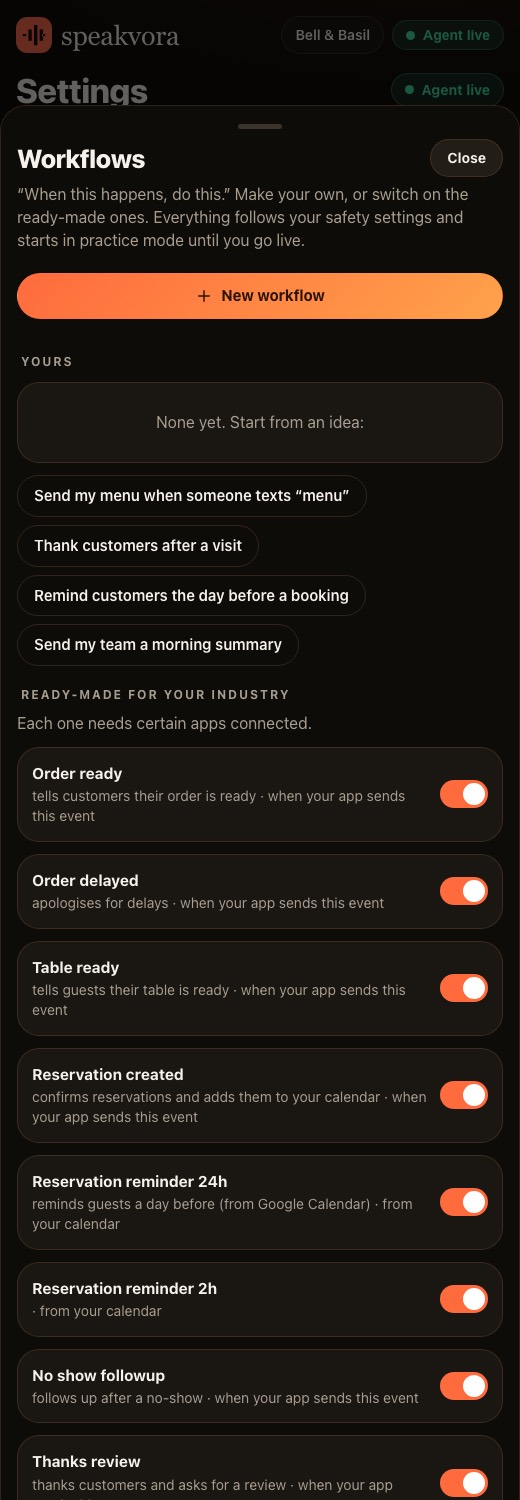
A no-show follow-up workflow is included in the ready-made kits and runs when your booking system sends that event.
Set it upin six steps.
Connect your calendar
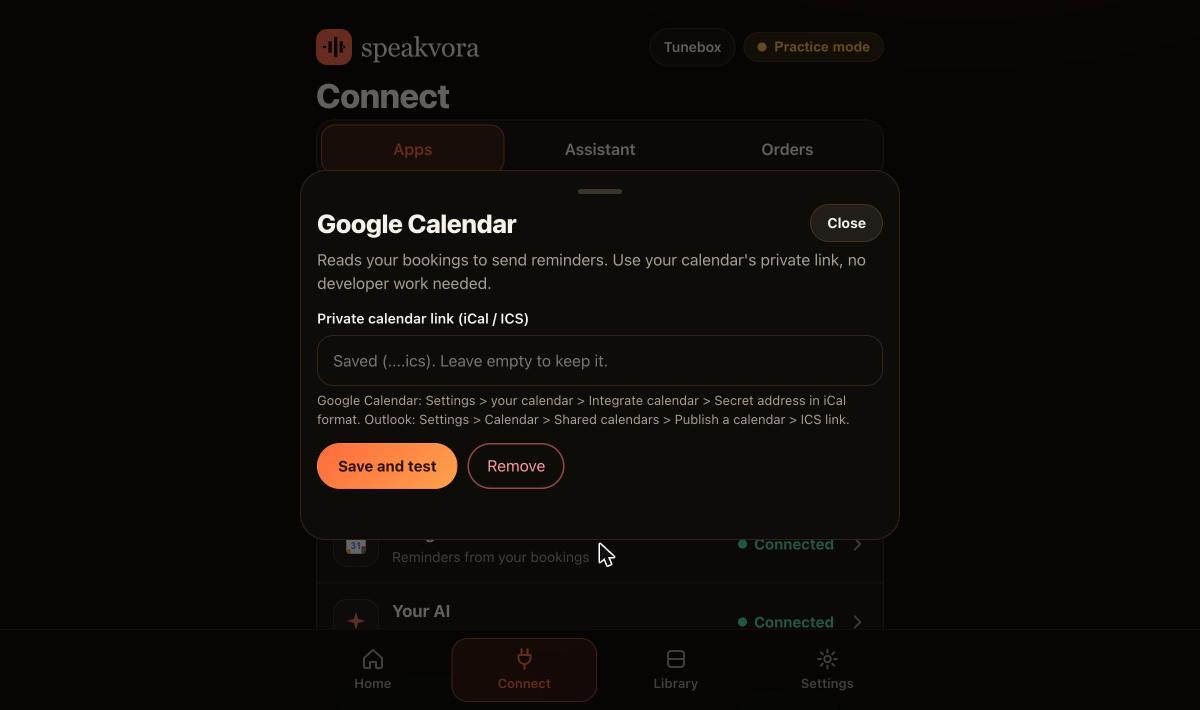
Google Calendar or Outlook, through the calendar's private link. Open Connect, then the calendar card, paste it and press Save and test.
Add the customer details
In each event's notes write Phone and SMS OK: yes. Without them the agent will not text that customer.
Connect a way to text
Twilio, or your own Android phone. Texting through a US Twilio number also needs carrier approval, which can take days.
Switch on the reminder
Open Workflows and switch on Reminds customers before their booking. Tick the times you want.
Test it
Use Test my agent in practice mode to see exactly what would be sent. Nothing goes to a customer.
Go live
Press Go live when the test looks right. Pause all sending stops everything at once.
Real screens,not mock-ups.
Captured from our own test set-ups with made-up customers. Names, addresses and keys are blurred or fake.
Honestlimits.
- Only calendar entries whose title contains the word you set (for example Appointment) are reminded.
- A secret Google link can take hours to show a new booking. Use the read-and-change connection for reminders that must fire on time. In link mode, repeating events are not expanded.
- By default each person gets at most 3 texts a day, and texts are held during quiet hours (default 9 PM to 8 AM).
- We do not publish no-show results. There are no customer case studies yet.
Evidence. An Outlook calendar reminder fired on time on one of our test accounts on 22 October 2026, and reminders from a live Google Calendar read were tested with agent 0.27.0. More than 500 automated tests run against simulated services. Not yet run by an independent business.
Pay once. Keep it.
Pay once and it is yours. Your agent keeps working forever and nothing is switched off. The first 12 months of support and upgrades are included. After that, support and upgrades continue only if you renew for $99 a year per location; if you do not, you keep the final version you have and it keeps working.
From $214, paid once per business location (audio only is $14 to $199; with the agent it is $214 to $399). Speakvora charges no fee per call, per text or per minute. Your phone or text provider bills your calls and texts, and an AI key is optional and billed by your AI provider.
New voice lines you ask the agent to create are voiced through your Speakvora account at $3 per million characters; lines you already have play free and offline. Outside services you connect, such as your phone provider, calendar, Slack or AI, keep their own prices and may change their rules.
Straightanswers.
How far ahead can reminders be sent?
You choose. Options are two days before, the day before, the morning of the booking at a time between 06:00 and 11:00, and four, two or one hour before. The default is the day before and two hours before.
Who pays for the reminder texts?
Your phone or text provider, for example Twilio, bills the texts. Speakvora charges no fee per text, per call or per minute.
Will it text someone who replied STOP?
No. A STOP reply opts that number out of texts and calls everywhere, and this cannot be switched off. START opts them back in.
Can it send a reminder twice?
No. It reminds each booking once per chosen time and never after the booking has started.
Can I try it without sending anything?
Yes. The agent starts in practice mode and records what it would do. Test my agent shows each reminder without sending it.
Does it work with Outlook?
Yes. Publish your Outlook calendar as an ICS link and paste it in. It is read-only, so reminders work but the agent does not write to Outlook.
Do reminders cut no-shows?
We cannot say. We have no published results and no customer case studies yet. Start in practice mode and judge it on your own bookings.
What does it cost?
From $214, paid once per business location, with no monthly fee. The first 12 months of support and upgrades are included.
See it for yourself.
Try the live demo, or see every workflow your agent runs.