Consent, STOP and quiet hours.
What your agent checks before every text or call, and what you can and cannot change.
How does an AI receptionist handle STOP, consent and quiet hours?
Every text and call your Speakvora agent sends is checked first. The customer needs consent or must have contacted you first, a STOP reply opts them out of texts and calls, quiet hours (default 9 PM to 8 AM) hold the message, and daily and hourly limits apply. STOP and the kill switch can never be switched off. This explains how it works; it is not legal advice.
Five checkson every send.
Consent
By default a customer message needs consent from your app, calendar notes or source mapping. People who contact you first can always be answered.
STOP
A STOP reply opts the number out of texts and calls everywhere until they opt in again with START. This is on purpose and cannot be switched off.
Quiet hours
Default 9 PM to 8 AM in your time zone. Strict mode is 8 PM to 9 AM. You can set your own window or turn them off, and the held message shows why.
Daily and hourly limits
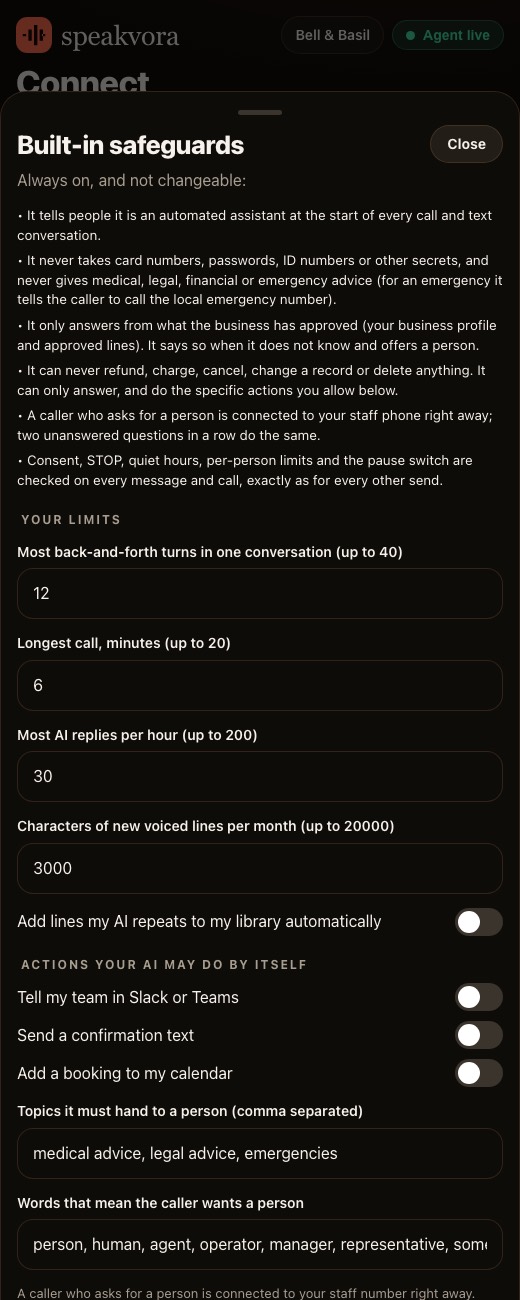
Standard mode allows 3 per person per day and 60 sends an hour. Strict allows 2 and 30. You can raise or remove them.
Kill switch
A file named STOP in the agent's state folder, or Pause all sending in the dashboard, stops every outgoing message at once.
Check your rulesbefore you go live.
Choose a mode
In agent.json set strict, standard or open. Standard is the default.
Review the limits
Open Settings, Built-in safeguards, and set the per-person limits and the quiet hours window.
Test a late text
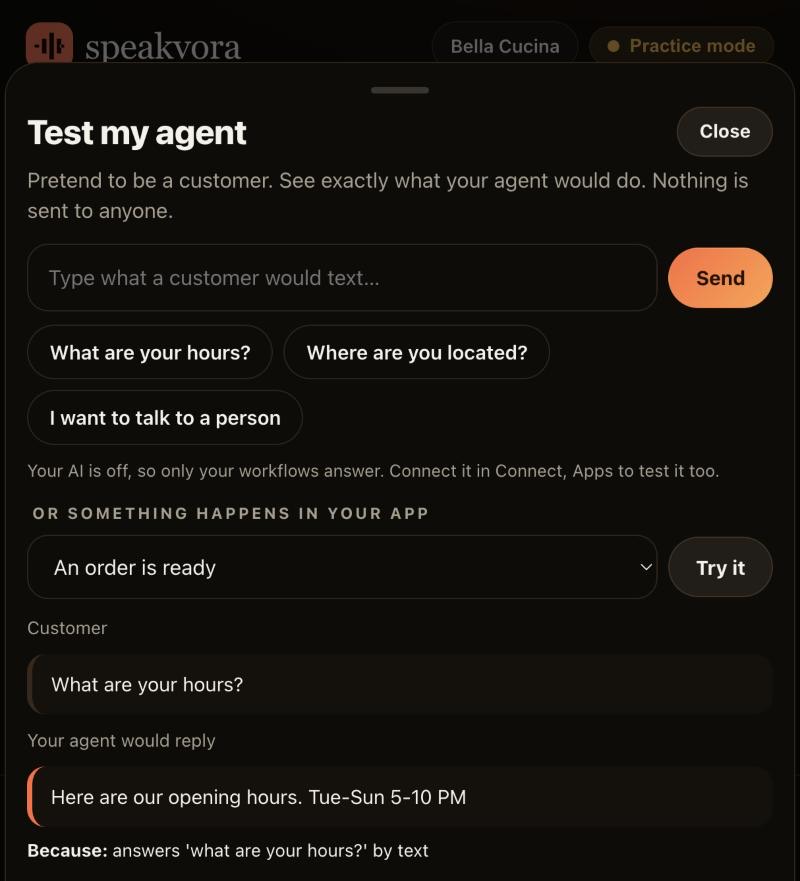
In Test my agent, try a text. If it is outside the allowed hours you see Would hold the text, with the reason.
Check STOP
Read what happens when a customer texts STOP. Tests use a made-up number and never touch your real opt-out list.
Stay in practice mode
The agent sends nothing until you press Go live. Keep the kill switch in mind from day one.
Real screens,not mock-ups.
Captured from our own test set-ups with made-up customers. Names, addresses and keys are blurred or fake.
Honestlimits.
- This page explains how the agent behaves. It is not legal advice and not a compliance certificate. Texting rules differ by country and state, so check your own.
- Consent comes from your records. If you switch the consent requirement off, that is your responsibility.
- Open mode has no limits and no quiet hours. Use it only if you have your own rules.
- Required lines for your industry, such as This is an automated call and the opt-out footer on texts, are always included.
- Texting through a US Twilio number also needs carrier approval, which can take days. Twilio keeps its own STOP list for your number.
Evidence. Documented and tested with simulated services; not yet run with a real business.
Pay once. Keep it.
Pay once and it is yours. Your agent keeps working forever and nothing is switched off. The first 12 months of support and upgrades are included. After that, support and upgrades continue only if you renew for $99 a year per location; if you do not, you keep the final version you have and it keeps working.
From $214, paid once per business location (audio only is $14 to $199; with the agent it is $214 to $399). Speakvora charges no fee per call, per text or per minute. Your phone or text provider bills your calls and texts, and an AI key is optional and billed by your AI provider.
New voice lines you ask the agent to create are voiced through your Speakvora account at $3 per million characters; lines you already have play free and offline. Outside services you connect, such as your phone provider, calendar, Slack or AI, keep their own prices and may change their rules.
Straightanswers.
What happens when a customer texts STOP?
The agent stops both texts and calls to that number until they opt in again with START. This cannot be switched off. Twilio also keeps its own STOP list for your number.
What are the default quiet hours?
9 PM to 8 AM in your time zone, for calls and texts. Strict mode uses 8 PM to 9 AM, and you can set your own window or turn them off.
How many texts can one person get per day?
Standard mode allows 3 per person per day and 60 sends an hour. Strict allows 2 and 30. You can set your own numbers or none.
Can I turn off the consent check?
Yes, if you hold your own consent records you can set consent as not required. That is then your responsibility. STOP is still always honoured.
Is there a kill switch?
Yes. A file named STOP in the agent's state folder, or Pause all sending in the dashboard, stops all outgoing messages at once.
Does it tell people they are talking to an automated system?
Yes. Required lines such as This is an automated call and the opt-out footer on texts are always included, and an AI assistant says it is automated at the start of every conversation.
Is this legal advice or a compliance guarantee?
No. It describes how the agent behaves. Rules differ by country and state, so check your own, and do not treat this page as legal advice.
What does it cost?
From $214, paid once per business location, with no monthly fee. Your phone provider bills calls and texts.
See it for yourself.
Try the live demo, or see every workflow your agent runs.