Reminders from your Outlook calendar.
Publish your calendar as a read-only link and the agent texts customers before their bookings.
Can an AI receptionist send reminders from an Outlook calendar?
Yes, for reminders. Publish your Outlook or Microsoft 365 calendar as an ICS link, paste it into your Speakvora agent, and it texts customers before their bookings at the times you choose. The link is read-only, so the agent does not add or change Outlook entries. You pay once, from $214 per business location.
What workswith Outlook.
A read-only link
Outlook publishes a calendar as an ICS link. The agent only reads it, so it cannot change your Outlook calendar.
The same smart reminder
Choose the day before, the morning of, or hours before. The agent picks the right line for each time and reminds each booking once per time.
Google and Outlook together
Both calendars can be connected at once, so a business that uses both gets reminders from each.
Practice mode first
Nothing is sent until you go live. Test my agent shows each reminder without sending it.
Connect Outlookin five steps.
Publish the calendar
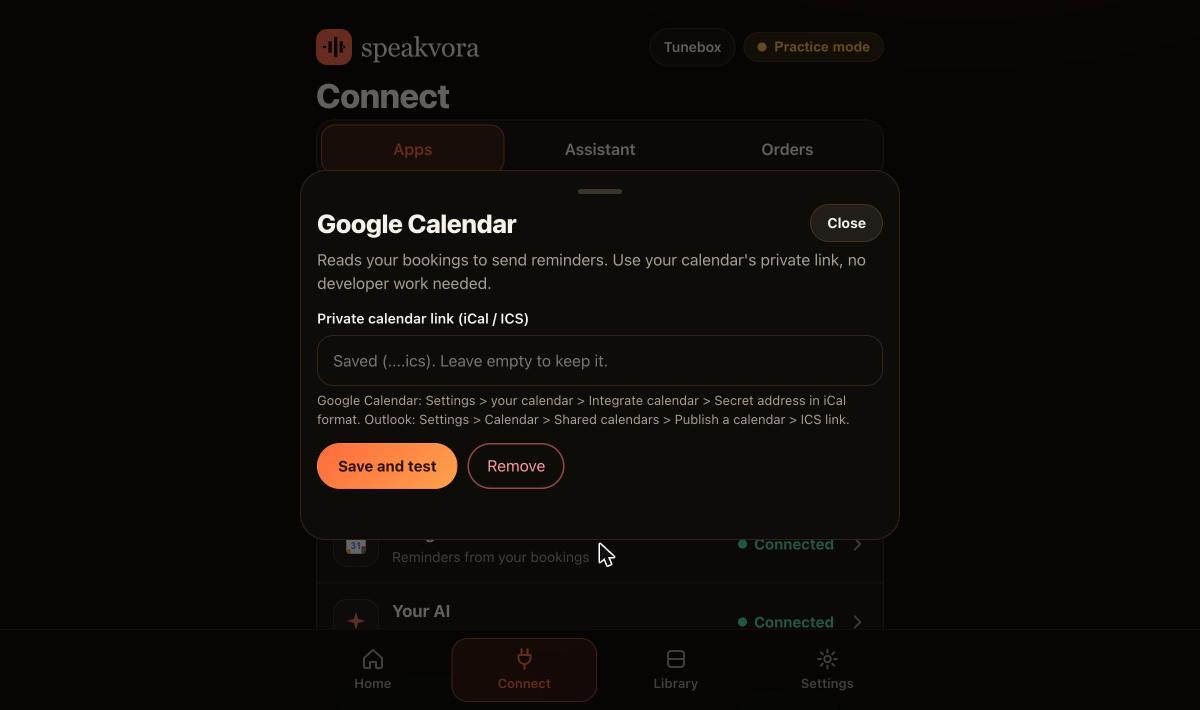
In Outlook open Settings, Calendar, Shared calendars, Publish a calendar, and copy the ICS link.
Paste the link
In the dashboard, open Connect and the calendar card. Paste the link and press Save and test. It tells you how many events it can see in the next 7 days.
Add the customer details
Write Phone and SMS OK: yes in each event's notes. Without them the agent will not text that customer.
Switch on the reminder
In Workflows, switch on Reminds customers before their booking and tick the times.
Test, then go live
Check the reminders with Test my agent in practice mode, then press Go live.
Real screens,not mock-ups.
Captured from our own test set-ups with made-up customers. Names, addresses and keys are blurred or fake.
Honestlimits.
- Outlook support is for reminders only. The agent does not book, move or cancel Outlook entries, because Microsoft calendars are read-only.
- Microsoft Teams alerts are a separate connection and are covered on the Teams page.
- A published calendar link can lag on the calendar provider's side, so check the first reminders in practice mode. You can also use your own Azure app with Calendars.Read instead of the link.
- We do not claim Outlook booking.
Evidence. An Outlook calendar reminder fired on time on one of our test accounts on 22 October 2026, and automated tests cover reading an Outlook ICS calendar, including Windows time zone names. Not yet run by an independent business.
Pay once. Keep it.
Pay once and it is yours. Your agent keeps working forever and nothing is switched off. The first 12 months of support and upgrades are included. After that, support and upgrades continue only if you renew for $99 a year per location; if you do not, you keep the final version you have and it keeps working.
From $214, paid once per business location (audio only is $14 to $199; with the agent it is $214 to $399). Speakvora charges no fee per call, per text or per minute. Your phone or text provider bills your calls and texts, and an AI key is optional and billed by your AI provider.
New voice lines you ask the agent to create are voiced through your Speakvora account at $3 per million characters; lines you already have play free and offline. Outside services you connect, such as your phone provider, calendar, Slack or AI, keep their own prices and may change their rules.
Straightanswers.
Can an AI receptionist send reminders from an Outlook calendar?
Yes. Publish the calendar as an ICS link, paste it into the Speakvora dashboard, and the agent texts customers before their bookings at the times you choose.
Can it book appointments in Outlook?
No. The Outlook connection is read-only, so it supports reminders but the agent does not add, move or cancel Outlook entries.
Does it work with Microsoft 365?
Yes, through the calendar's published ICS link. You can also use your own Azure app with the Calendars.Read permission.
Was it tested with a real Outlook calendar?
Yes. An Outlook calendar reminder fired on time on one of our test accounts on 22 October 2026. It has not been run by an independent business yet.
Can I use Outlook and Google Calendar together?
Yes. Both can be connected at the same time.
Does it need Microsoft Teams?
No. Teams alerts are separate. Reminders only need the calendar link and a way to send texts.
Who pays for the texts?
Your phone or text provider. Speakvora charges no fee per text, per call or per minute.
What does it cost?
From $214, paid once per business location, with no monthly fee. The first 12 months of support and upgrades are included.
See it for yourself.
Try the live demo, or see every workflow your agent runs.