Teams alerts, and replies from Teams.
Post to a channel with a Teams workflow link. Add an Outgoing Webhook and your team can answer back.
Can an AI receptionist send alerts to Microsoft Teams?
Yes. Your Speakvora agent posts alerts from its workflows, including bug-desk alerts, to a Microsoft Teams channel using a Teams workflow link. With an Outgoing Webhook your team can also reply by @mentioning the agent, for example BUG-17 fixed. No Azure subscription or bot registration is needed. You pay once, from $214 per business location, with no fee per alert.
What you getin Teams.
One link to connect
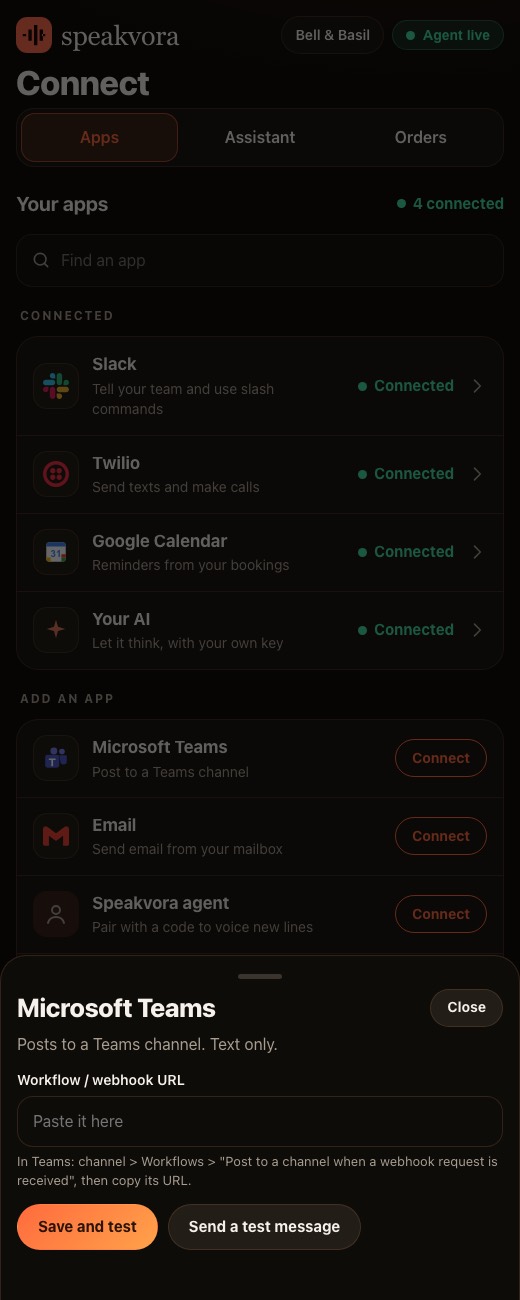
In Teams, make a workflow that posts to a channel when a webhook request is received. Paste its link into the dashboard and send a test message.
Replies by @mention
With an Outgoing Webhook your team answers from the channel: add a note, move a ticket to In progress, say fixed, approve or keep open.
Signed and checked
Each reply is checked with the token Teams gave you. Wrong signatures are refused, messages older than 15 minutes are refused, and the same message is never handled twice.
Same rules as Slack
Teams replies go to the same bug-desk logic as Slack. Closing a ticket still asks you first, and cards, emails, phone numbers and keys are removed before they reach Jira.
Slack too
The tell-your-team step posts to Slack, Teams or both, whichever you connected.
Connect Teamsstep by step.
Make the workflow link
In the Teams channel choose Workflows, Post to a channel when a webhook request is received, and copy the link.
Paste it in the dashboard
Open Connect, Microsoft Teams, paste it and press Save and test. A test message is posted.
Create an Outgoing Webhook
For replies: in the team, Manage team, Apps, Create an outgoing webhook. Name it, because people @mention that name.
Point it at your agent
Set the callback address to your agent's permanent address plus /teams/messages. Teams shows a security token once.
Save the token and test
Paste the token into the second box on the Teams card, save, and press Test answering from Teams.
Reply from the channel
In the channel write @name BUG-17 looking into it, or fixed, then approve when the agent asks.
Real screens,not mock-ups.
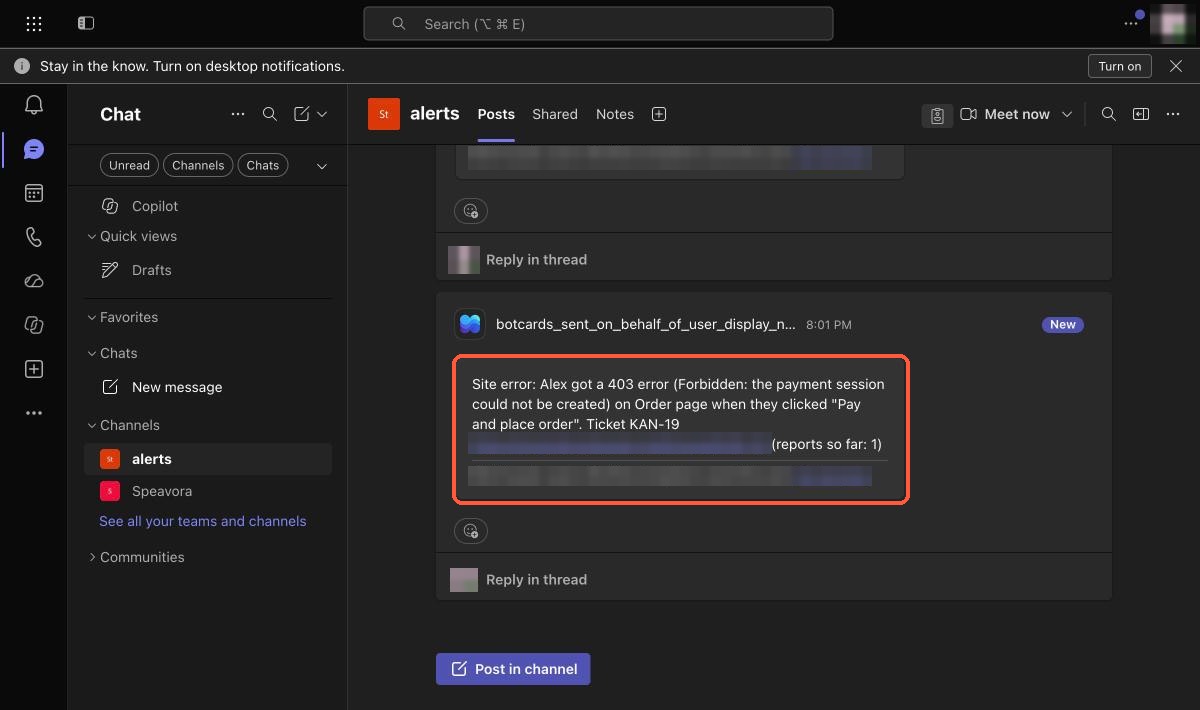
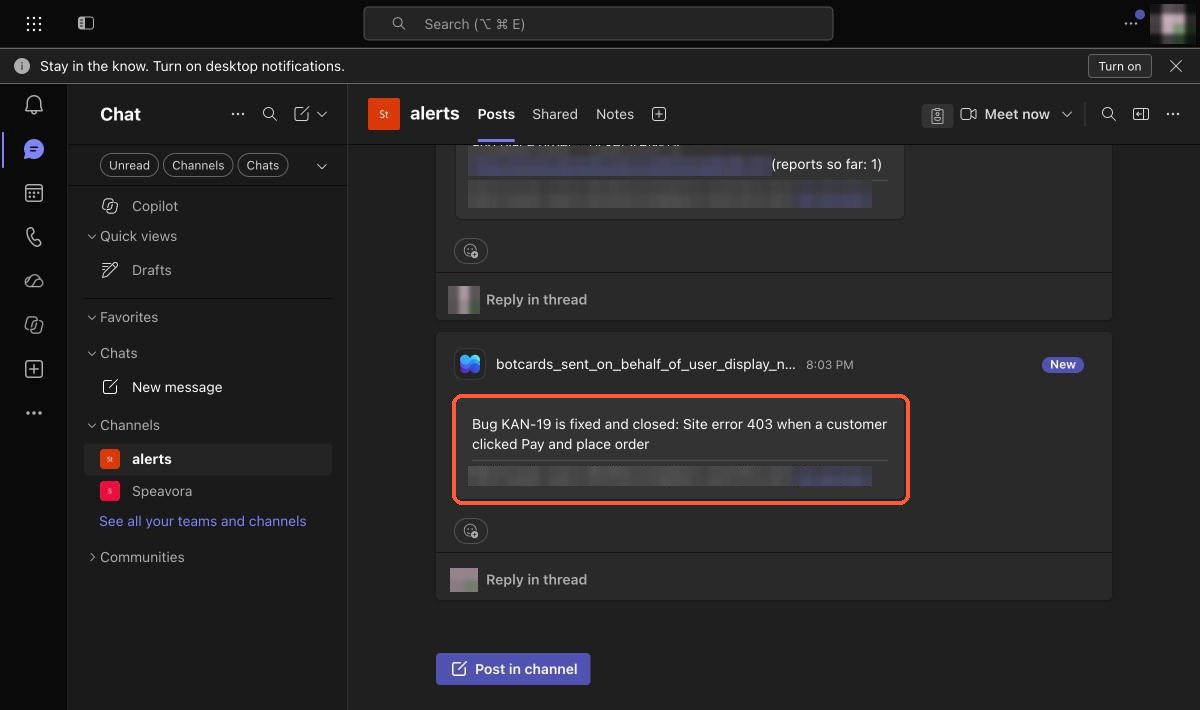
Captured from our own test set-ups with made-up customers. Names, addresses and keys are blurred or fake.
Honestlimits.
- Teams sends the agent a message only when someone @mentions it, and it must be written in the channel, not a private chat.
- Replies must come within about five seconds. The bug desk answers locally, but a slow Jira can time out, and the action still completes.
- This route cannot send proactive messages, direct messages, reminders or approval cards. A full Azure bot would add those and is not built.
- Teams alerts are text only.
Evidence. Posting to a Microsoft Teams channel was tested live by us on a test channel (the screenshots above, 24 October 2026). Replying from Teams is documented and covered by automated tests with signed sample messages; we do not claim a live reply test here. Not yet run by an independent business.
Pay once. Keep it.
Pay once and it is yours. Your agent keeps working forever and nothing is switched off. The first 12 months of support and upgrades are included. After that, support and upgrades continue only if you renew for $99 a year per location; if you do not, you keep the final version you have and it keeps working.
From $214, paid once per business location (audio only is $14 to $199; with the agent it is $214 to $399). Speakvora charges no fee per call, per text or per minute. Your phone or text provider bills your calls and texts, and an AI key is optional and billed by your AI provider.
New voice lines you ask the agent to create are voiced through your Speakvora account at $3 per million characters; lines you already have play free and offline. Outside services you connect, such as your phone provider, calendar, Slack or AI, keep their own prices and may change their rules.
Straightanswers.
Can an AI receptionist send alerts to Microsoft Teams?
Yes. The agent posts to a Teams channel through a Teams workflow link. Paste the link into the dashboard, press Save and test, and a test message is posted.
Do I need an Azure bot or subscription?
No. Two-way replies use a Teams Outgoing Webhook, which needs no Azure subscription or bot registration.
Can my team reply from Teams?
Yes, by @mentioning the agent in the channel, for example BUG-17 fixed. The reply goes to the same logic as a Slack reply.
Is it secure?
Each reply is checked with the security token Teams gives you. A wrong signature is refused, a message older than 15 minutes is refused, and eight wrong tries from one address lock that address out for ten minutes.
Can it send me direct messages or buttons in Teams?
Not yet. This route has no proactive messages, no direct messages and no approval cards. A full Azure bot would add them and is not built.
Does it work with Slack as well?
Yes. The tell-your-team step posts to Slack, Teams or both.
Is there a charge per alert?
No. Speakvora charges no per-alert, per-call or per-minute fee. Your Microsoft 365 plan is your own.
What does it cost?
From $214, paid once per business location, with no monthly fee. The first 12 months of support and upgrades are included.
See it for yourself.
Try the live demo, or see every workflow your agent runs.