The AI bug desk, explained.
How a Speakvora agent follows a bug from the first customer report to the fix, and tells the customer.
What is the Speakvora bug desk?
The bug desk is a workflow in your Speakvora agent. When a customer reports a bug by text, email, call or from your app, the agent opens or updates the Jira ticket, adds a row to your Confluence known-issues page, alerts your team in Slack or Teams, and shows the deploys and changed files that came just before the report. Your team replies in Slack, you approve the close, and the people who reported it are told it is fixed. It runs on your own computer, you pay once, and practice mode writes nothing until you go live.
From first report to fixed.
When it started
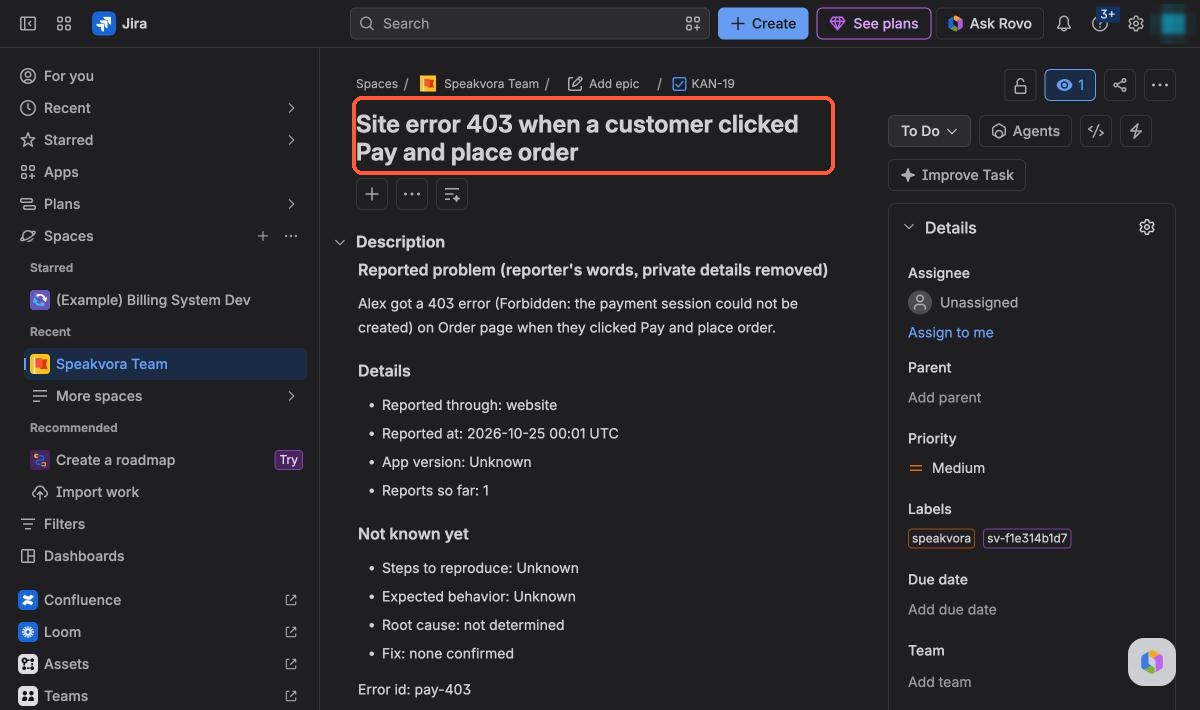
The ticket records the time of the first report. Later reports of the same problem are added to the same ticket.
How many reported it
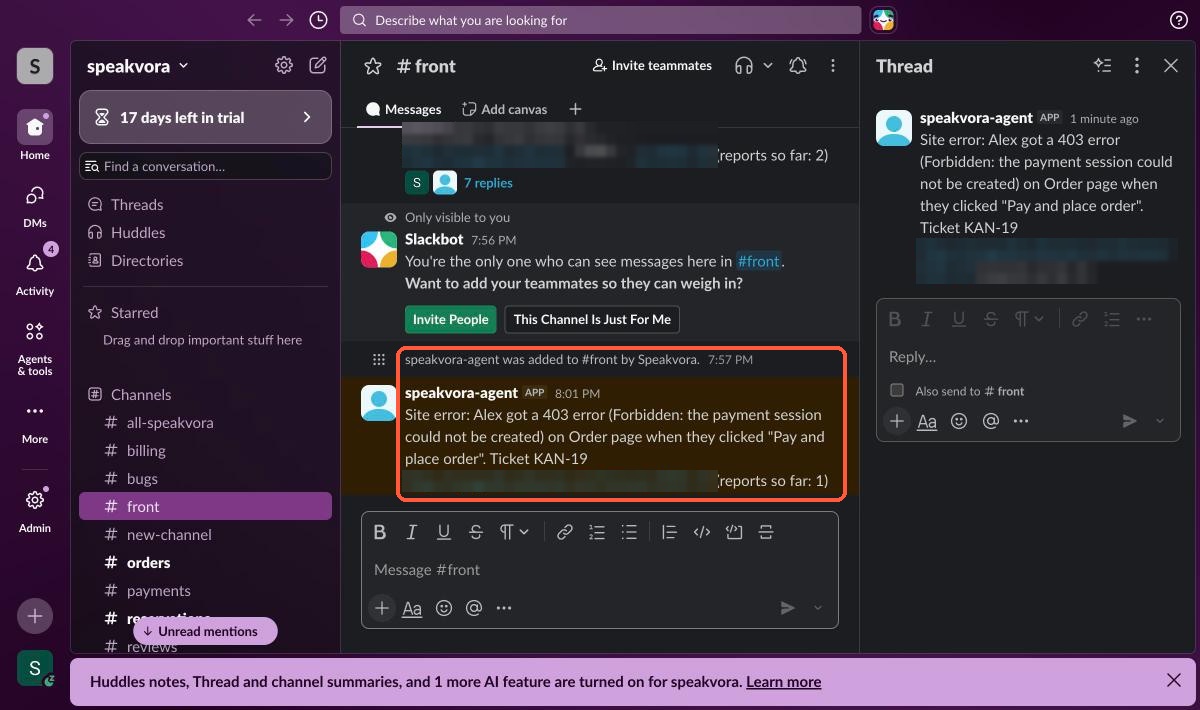
Every ticket and Slack alert shows “reports so far.” That counts the reports your agent received, not every person your product reaches.
What changed first
With GitHub or GitLab connected, the ticket names the newest deploy, release or merge before the report, with its time gap, labelled as timing only. Staging deploys are ignored.
What the team is doing
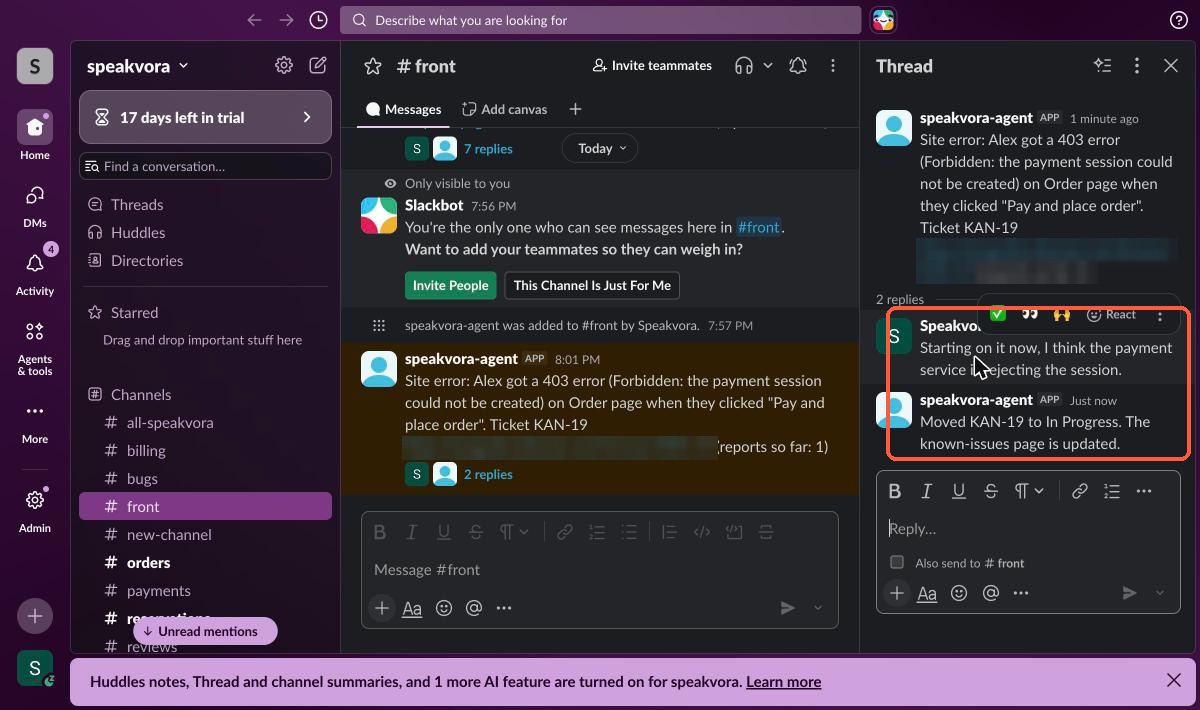
Replies in the alert's Slack thread become notes on the Jira ticket. With your own AI connected, a reply like “looking into it” moves the ticket to In Progress.
Who was told
When you approve the fix, everyone who reported it by text or email is told once. The ticket says how many were told.
Step by step.
A customer reports it
By text, email or call, or your own app sends the error.
Your team is alerted
A short Slack message (and Teams, if connected) with the details.
A Jira ticket is opened
A new bug, or the report is added to the matching one.
Confluence stays current
Your known-issues page gets a new row.
It shows what changed
Recent GitHub or GitLab deploys and changed files are added as possible causes.
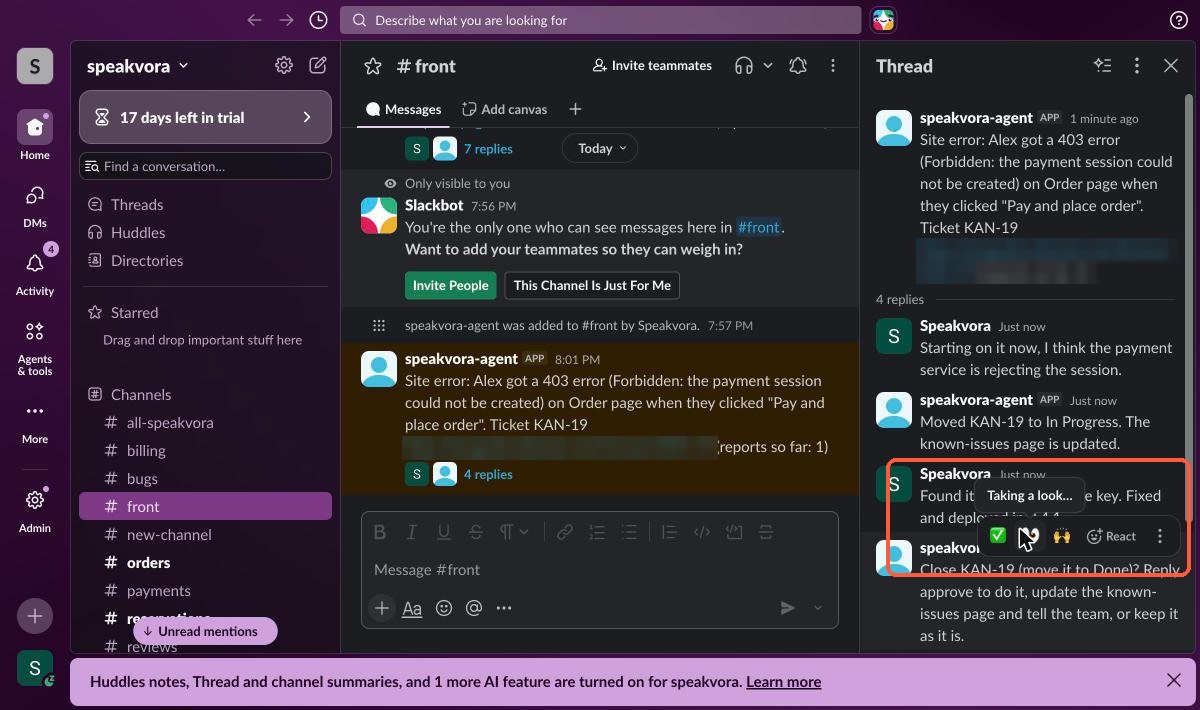
Approve the fix in Slack
Say it's fixed. The agent asks you to approve, then closes the ticket and marks the row Fixed with the date.
The customer is told
A short text or email: the problem you reported is fixed.
If it comes back
A new ticket is opened and linked to the old one.
A real run, screen by screen.
Captured on 24 October 2026 in our own Jira, Slack and Confluence test workspaces, with a made-up customer. Nothing here is a mock-up.
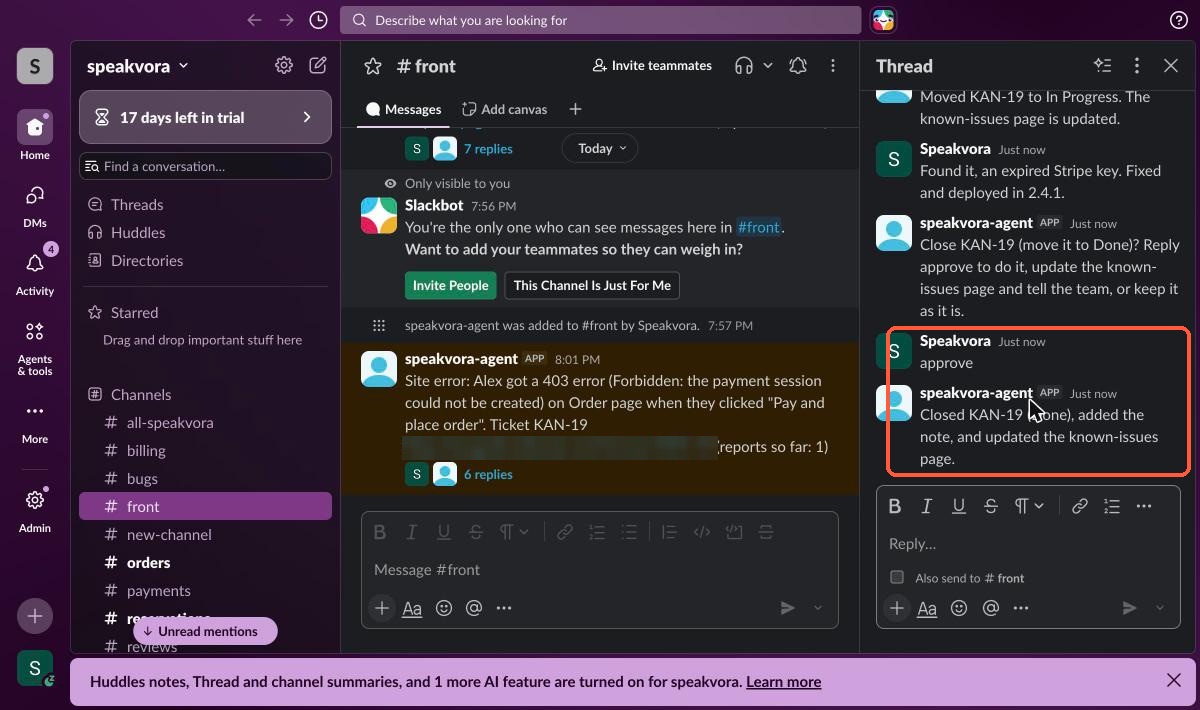
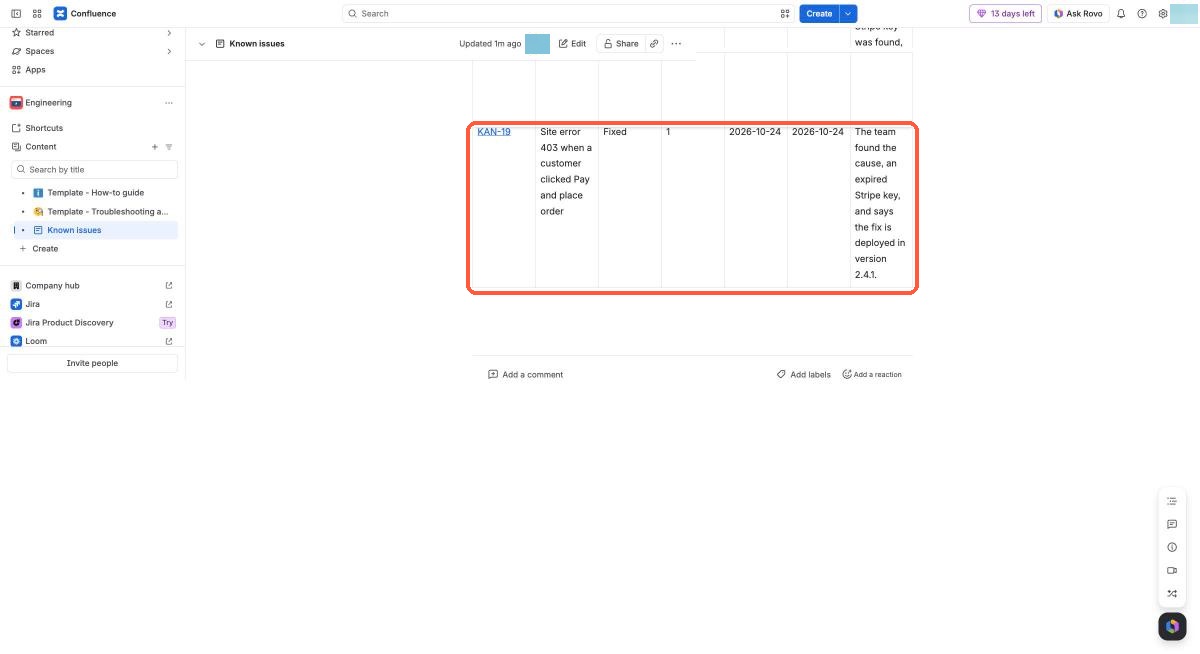
Not in these screenshots yet: the GitHub or GitLab “what changed” line and the text sent to the customer. Both are described in the agent documentation and are not shown here as proof.
You stay in control.
Needs your Jira, Slack and Confluence connected. Code history needs GitHub or GitLab.
Practice mode first
Nothing is written to Jira, Confluence or Slack until you go live.
You approve the close
It asks before it closes a ticket. Auto-close is optional.
Private details removed
Card numbers, passwords, emails and keys are stripped from notes.
Evidence, not proof
Possible causes show what changed. A person decides what is true.
Straight answers.
Can an AI agent track a bug from the first report to the fix?
Yes. The Speakvora bug desk opens or updates the Jira ticket when a customer reports a bug, records when it was first reported and how many reports came in, shows the deploys and changed files before the report when GitHub or GitLab is connected, turns replies in the team's Slack thread into notes on the ticket, and tells the people who reported it once you approve the fix.
Does it find the commit that caused the bug?
No. It shows the newest deploy, release or merge before the first report, with the time gap, and lists changed file names as possible causes. It is labelled timing only, not a diagnosis. A person decides what is true.
Does it count how many users are affected?
It counts the reports your agent received and shows that number on the ticket and the Slack alert. That is not a measure of everyone using your product.
How does the customer hear that it is fixed?
When the ticket is closed as fixed, each person who reported the bug by text or email, or through your app with consent, gets one short message. It goes through the normal consent, STOP, quiet hours and limit checks. A ticket closed as won't fix sends nothing.
Does it close tickets on its own?
Not by default. It asks in Slack first and waits for you to reply approve. Auto-close is an optional setting, and in practice mode nothing is written to Jira, Confluence or Slack.
What happens if the bug comes back?
A new ticket is opened and linked to the old one, the old ticket gets a comment, and the Slack alert starts with REGRESSION and offers to reopen the old ticket on your approval.
What does it need?
Jira, Slack and Confluence connected for the core workflow. GitHub or GitLab adds the code history. Teams receives alerts but its replies cannot be read, so approvals happen in Slack.
Stop chasing bug reports.
Try it live, or see every workflow your agent runs.