Books into your Google Calendar.
Read-only reminders in minutes, or full booking when you connect your own Google Cloud project.
Can an AI receptionist book into Google Calendar?
Yes. Connected with change access, the Speakvora agent adds, moves, cancels and deletes its own bookings in a Google Calendar you choose, and it checks the calendar first so it does not double book. With read-only access it reads bookings to send reminders. It runs on your computer and you pay once, from $214 per business location.
What it doeswith your calendar.
Two ways to connect
Read only: paste your calendar's secret iCal address and the agent reads bookings for reminders. Read and change: connect your own Google account so it can add, move, cancel or delete bookings.
Four booking actions
When your booking system sends an event, the agent creates a new entry, moves the same entry, marks one Cancelled and shown as free, or deletes it.
No double booking
Before it adds or moves a booking it looks at the calendar. If a timed entry marked busy overlaps, it does not book and tells your team why. Back-to-back bookings are fine.
Only its own entries
The agent tags what it creates and refuses to change anything without the tag. Events you or anyone else added are never touched.
Waits if the internet drops
A change made while the internet is down waits in the offline outbox and goes out in order when it returns.
Connect itstep by step.
Choose a mode
Read only is easiest and cannot change your calendar. Read and change lets the agent book.
Read only: copy the secret address
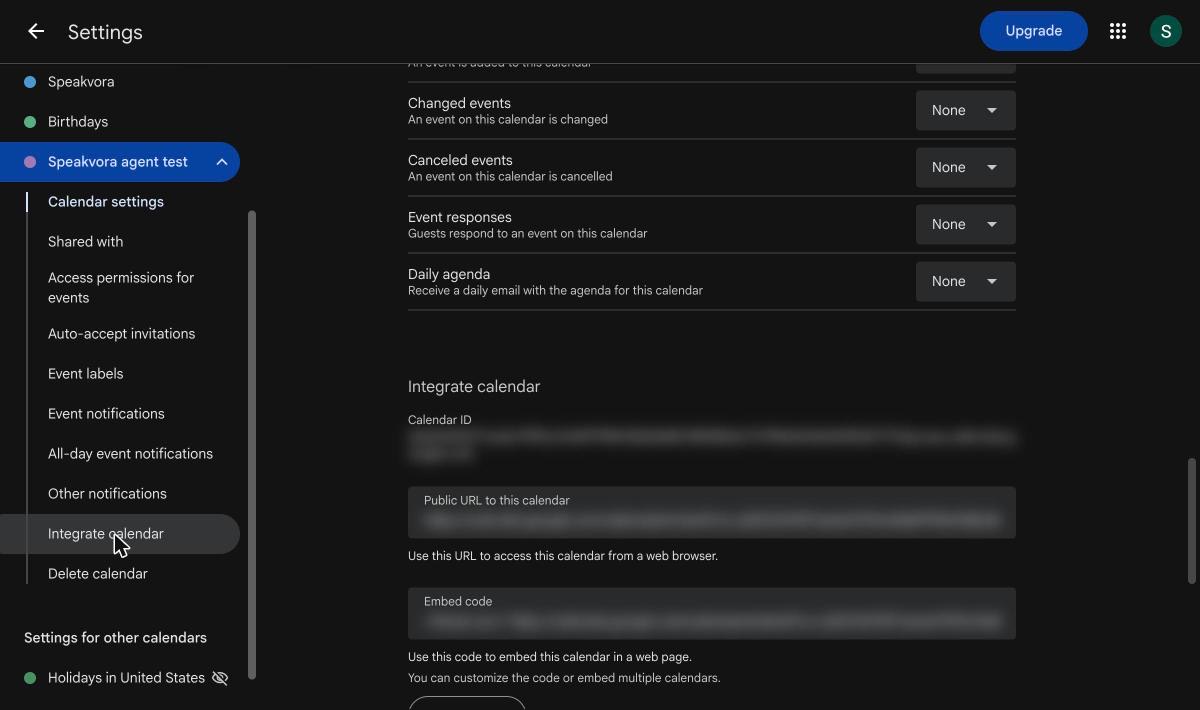
In Google Calendar open Settings, your calendar, Integrate calendar, and copy Secret address in iCal format. Do not use the public address.
Paste it in the dashboard
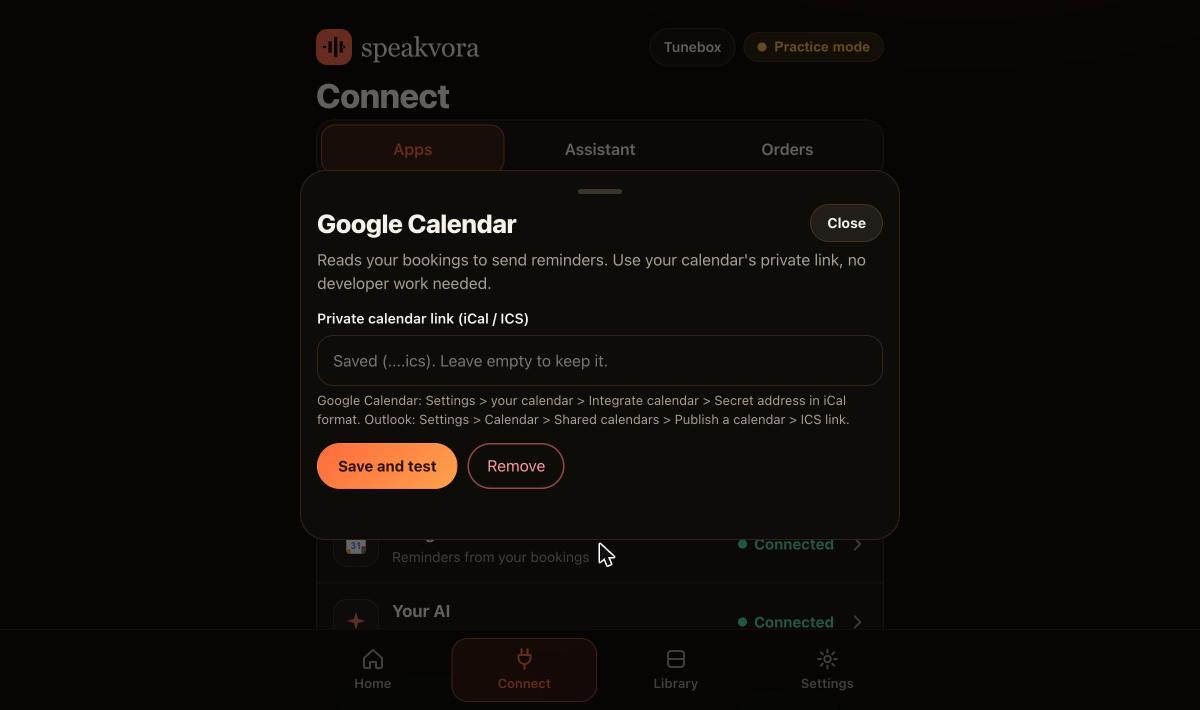
Connect, Google Calendar, Save and test. It checks that the address returns a calendar and tells you how many events it can see in the next 7 days.
Booking: make a free OAuth client
In your own Google Cloud project turn on the Google Calendar API, add yourself as a test user and create a Desktop app client. It takes about 10 minutes.
Run the helper on your computer
A small script opens Google's consent page, asks only for permission to create and change calendar events, and saves the key on your computer, not on a web page.
Restart and test
Restart the agent and press Save and test. Use a separate calendar for bookings, and check everything in practice mode first.
Real screens,not mock-ups.
Captured from our own test set-ups with made-up customers. Names, addresses and keys are blurred or fake.
Honestlimits.
- It does not invite guests or add video-call links, and it does not change repeating series.
- Outlook and Microsoft calendars are read-only for reminders; the agent does not write to them.
- The AI can add a booking during a conversation only when you allow it. It cannot move or cancel a booking during a conversation.
- A secret iCal link can take hours to show a new event, so use the read-and-change mode for reminders that must fire on time.
- In Google's Testing mode the access token expires after 7 days unless you press Publish app on the Audience page. You do not need Google's verification for a calendar only you use.
Evidence. Tested live by us against a real Google Calendar with agent 0.27.0: create, reschedule, cancel, delete, double-booking protection, reminders from a live read, and a check that the agent refuses to change an event it did not create. The OAuth set-up was tested on 24 October 2026. Not yet run by an independent business.
Pay once. Keep it.
Pay once and it is yours. Your agent keeps working forever and nothing is switched off. The first 12 months of support and upgrades are included. After that, support and upgrades continue only if you renew for $99 a year per location; if you do not, you keep the final version you have and it keeps working.
From $214, paid once per business location (audio only is $14 to $199; with the agent it is $214 to $399). Speakvora charges no fee per call, per text or per minute. Your phone or text provider bills your calls and texts, and an AI key is optional and billed by your AI provider.
New voice lines you ask the agent to create are voiced through your Speakvora account at $3 per million characters; lines you already have play free and offline. Outside services you connect, such as your phone provider, calendar, Slack or AI, keep their own prices and may change their rules.
Straightanswers.
Can an AI receptionist book into Google Calendar?
Yes. With read-and-change access the Speakvora agent adds, moves, cancels and deletes its own bookings in the calendar you choose, when your booking system or a workflow sends it the event.
Does it prevent double booking?
Yes. Before it adds or moves a booking it looks at the calendar. If a timed entry marked busy overlaps, it does not book and the workflow shows why. All-day entries and entries marked free never block.
Can it change events it did not create?
No. The agent finds entries by your booking reference and a tag it adds when it creates them. Anything without the tag is refused. We tested this against a real calendar.
Do I need Google Workspace?
The documented set-up uses an ordinary Google account and your own free Google Cloud project. The read-only mode needs only the secret iCal address from your calendar settings.
What if Google's login expires?
In Google's Testing mode the refresh token expires after 7 days unless you press Publish app on the Audience page. Publishing keeps the token alive, and you do not need Google's verification for a calendar only you use.
Does it need the internet to book?
Yes, to reach Google. If the internet is down, the change waits in the offline outbox and goes out in order when it returns.
Can it send appointment reminders from the same calendar?
Yes. It reads bookings from the calendar and texts customers at the times you choose, once per booking per time.
What does it cost?
From $214, paid once per business location, with no monthly fee. Google Calendar is free to connect. Your phone provider bills any texts.
See it for yourself.
Try the live demo, or see every workflow your agent runs.