Texts and calls with Twilio
A step-by-step guide with pictures, from the Speakvora agent's own Connect tab.
Short answer: Twilio sells phone numbers and carries your texts and calls. You pay Twilio directly; Speakvora adds no per-message fee. Time: 20 minutes for calls, a few days for business texting to be approved. If you want to text sooner, connect your Android phone, Telegram or WhatsApp as well (see their guides).
Every key, number and name in the pictures is a made-up example. Nothing here asks you to share a real key with anyone but the app on your own computer.
Twilio sells phone numbers and carries your texts and calls. You pay Twilio directly; Speakvora adds no per-message fee. Time: 20 minutes for calls, a few days for business texting to be approved. If you want to text sooner, connect your Android phone, Telegram or WhatsApp as well (see their guides).
Step 1. Create the account and buy a number
GOAL: a Twilio account with one phone number that can call and text.
- Go to [[twilio.com]] and sign up. A free trial account works for testing but can only reach phone numbers you verify, and adds a "trial" message to calls.
- To remove the trial limits, upgrade the account and add a small balance (for example $20).
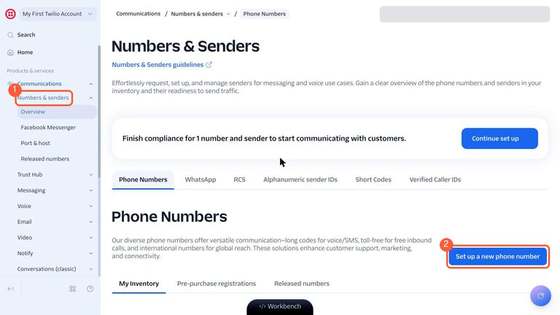
- In the Twilio Console press Communications in the left menu, then Numbers & senders (1). On the page that opens press Set up a new phone number (2).
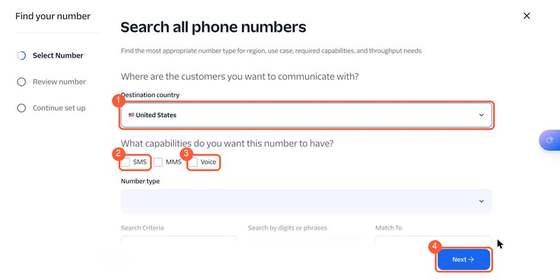
- A window called Find your number opens. Pick your country (1), tick SMS (2) and Voice (3), then press Next (4) and choose a number from the list. A US local number costs about $1.15 a month.
YOU SHOULD SEE: your new number in the list under Numbers & senders, with a green Active status. If you only wanted to look, close the window: nothing is bought until you confirm and pay.
Step 2. Find your account details
GOAL: copy two values from the Twilio Console home page: the Account SID and the Auth Token.
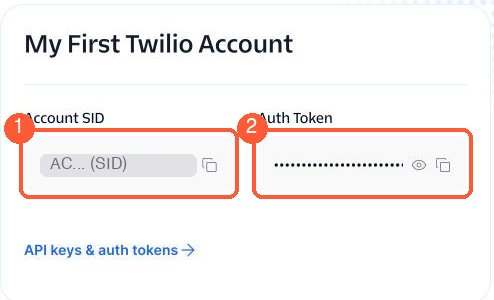
- Press Home (top of the left menu). You will see a box called My First Twilio Account (the name may differ).
- The Account SID (1) starts with the letters AC. Press the copy icon next to it.
- The Auth Token (2) shows only dots. Press the eye icon to reveal it, then the copy icon next to it.
WARNING: Keep both private. Anyone who has them can spend your Twilio balance. Never post them in a chat or a public place.
TIP: To copy with the keyboard: click inside the box, press Command + C on a Mac or Ctrl + C on Windows. Nothing will look different.
Step 3. Connect it to the agent
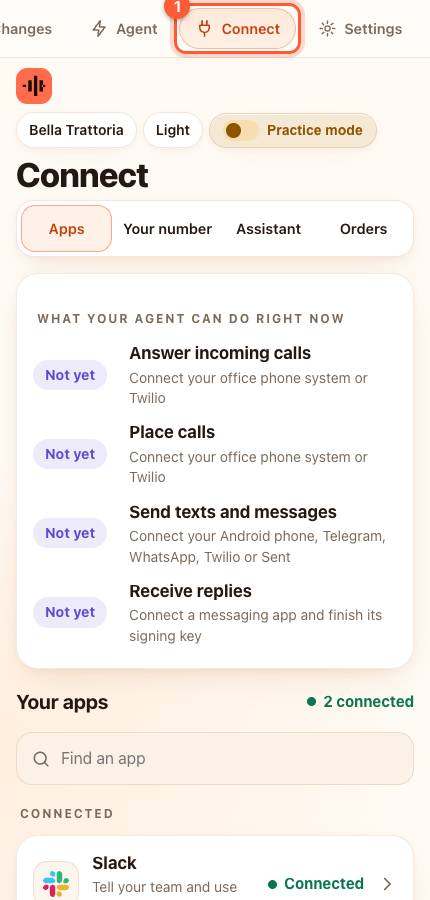
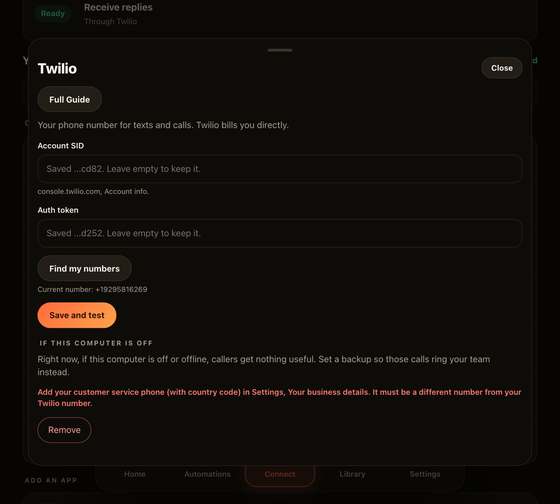
- In the agent press Connect, then find Texts and calls (Twilio) in the list (type Twilio in the box that says Find an app). A card slides up.
- Click inside Account SID, paste (Command + V on a Mac, Ctrl + V on Windows), then the same for Auth token. Press Save and test.
YOU SHOULD SEE: green words saying Connected, with your Twilio account name. If you see red words instead, re-copy the SID and the token (see If something is wrong).
- Press Find my numbers and choose the number you bought.
- Under Last step press the button that points that number at your agent. The agent sets the number's call and text addresses in Twilio for you, so you never edit them by hand. This needs your agent's public web address (Settings, Your business details).
Step 4. If you are in the US: register for business texting
US carriers block business texts from unregistered numbers.
- In the Twilio Console open Messaging, Regulatory Compliance, A2P 10DLC and register your business (a brand) and a campaign. Choose "Customer care" as the use case. Approval takes a few days.
- Or use a toll-free number and complete its verification (also a few days).
- Until approved, calls work but texts to US numbers may be blocked.
Step 5. If this computer is off
Calls would otherwise go unanswered. In the agent, Connect, Texts and calls, open If this computer is off and follow the steps there so Twilio rings your staff phone instead.
Try it
- Call your Twilio number. You should hear your menu.
- Text it "what are your hours" (after texting is approved).
If something is wrong
- Test says the account was not accepted: re-copy the SID and token.
- A number is missing from the list: it must be on the same Twilio account (not a subaccount) as the SID you pasted.
- Customers do not get texts: check Twilio, Monitor, Logs, Messaging for the error code (often a missing registration).
All help guides · Every agent feature · AI receptionist by industry
Questions
What is this guide for?
Twilio sells phone numbers and carries your texts and calls. You pay Twilio directly; Speakvora adds no per-message fee. Time: 20 minutes for calls, a few days for business texting to be approved. If you want to text sooner, connect your Android phone, Telegram or WhatsApp as well (see their guides).