Connect Rezdy
A step-by-step guide with pictures, from the Speakvora agent's own Connect tab.
Short answer: This connects your own Rezdy account to your Speakvora agent. Then a customer can text where is order 1234 and get the answer in seconds, and the agent can send status and tracking texts. The agent only reads. It can never create, change or delete anything in Rezdy. Only the status word and the order number are ever.
Every key, number and name in the pictures is a made-up example. Nothing here asks you to share a real key with anyone but the app on your own computer.
This connects your own Rezdy account to your Speakvora agent. Then a customer can text *where is order 1234* and get the answer in seconds, and the agent can send status and tracking texts. The agent only reads. It can never create, change or delete anything in Rezdy. Only the status word and the order number are ever texted back, never names, prices, items or addresses.
TIP: You need about 15 minutes, a computer, and the sign-in for your Rezdy account (the owner or a manager). You can't break anything: if a step does not work, nothing has changed and you can just try again. The keys and screens below are made-up examples.
NOTE: This guide was written from Rezdy's public developer documentation (the addresses and sign-in style were read there) and has not been tried yet on a live Rezdy account. If a screen looks different from what is described, press Connect, then Download report, and send it to support. We fix it for everyone.
Who this is for: guidance wayfinding. How Rezdy gives access: You create the key yourself in your own account; no approval is needed. What it costs you: Rezdy does not state a separate fee for API access; plan gating is not documented. Limit is 100 calls per minute per key.
Part 1. Get your key from Rezdy
Do this on your computer, in a new browser tab, signed in to Rezdy.
- Sign in to Rezdy as the account owner.
- Open [[Integrations > Rezdy API]].
- If the Rezdy API menu is not there, email support@rezdy.com and ask for a production API key with read access to bookings.
- Request the API key and wait for Rezdy to process it (up to 48 hours).
- Copy the production key when it is issued (staging keys do not work on the live account).
- Paste the key into Speakvora in the Rezdy API key field.
- Press Test connection; Speakvora only reads bookings and never creates or cancels them.
WARNING: If Rezdy asks which permissions to give, tick only the read-only ones: bookings: read. Never give write or admin access.
TIP: To copy the key, click inside the box that shows it, press Command + C on a Mac or Ctrl + C on Windows (or right-click and choose Copy). Nothing will look different. It is now in your clipboard, ready to paste. Keep it private: anyone who has it can read your orders.
Part 2. Open the Connect tab in your agent
- Open your agent's dashboard (the page you open from the Start Speakvora Agent file).
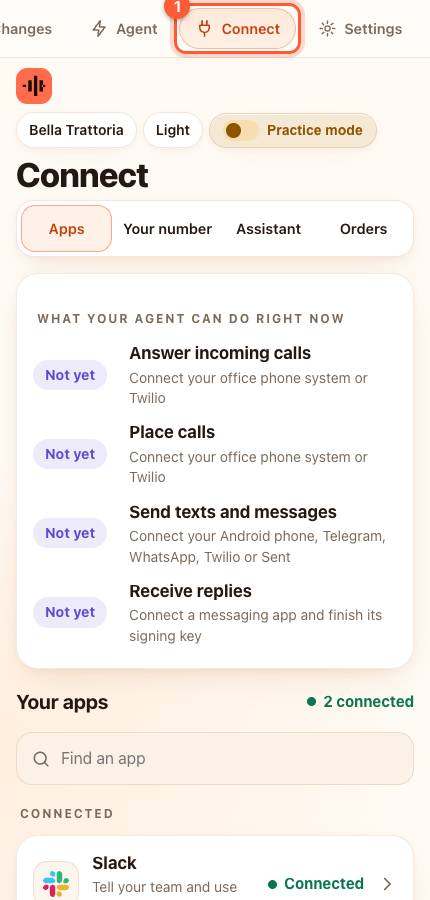
- Press Connect in the menu. On a phone the menu is the bar along the top; slide it sideways if you do not see Connect.
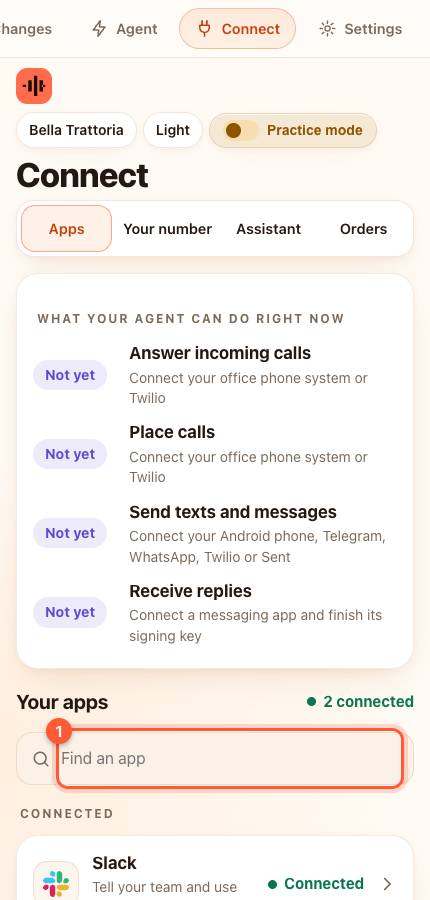
- Under Your apps type Rezdy in the box that says Find an app (1), or scroll down the list.
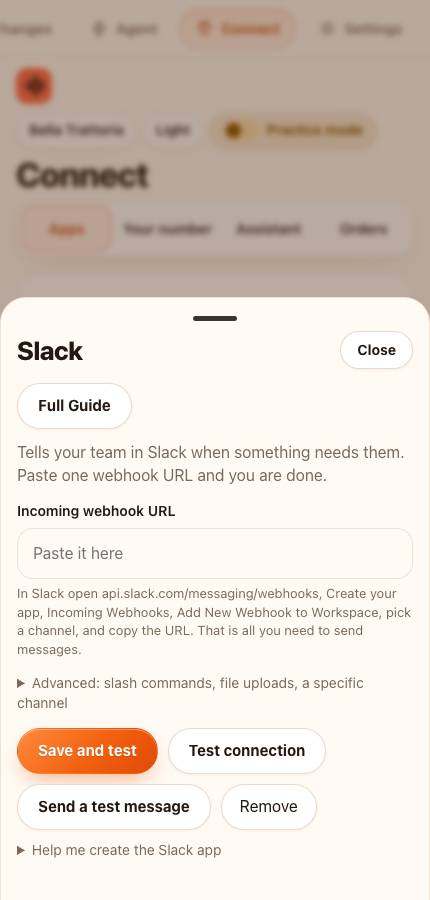
- Press Rezdy. A card slides up. (If you only see apps for your own kind of business, that is on purpose: your agent only shows the systems that make sense for it.)
Part 3. Paste it in
1 box to fill in. Click inside a box, press Command + V on a Mac or Ctrl + V on Windows, then move to the next:
- Rezdy API key (secret: it stays on this computer and is never shown again, only the last few characters). The API key Rezdy issues to your company after you request it from the Rezdy dashboard (Integrations > Rezdy API).
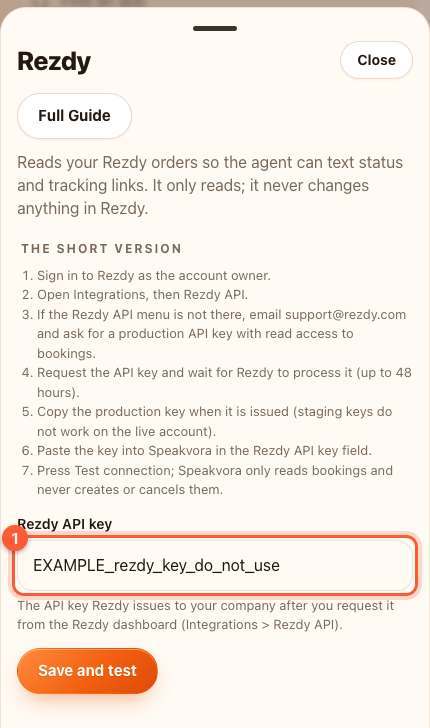
TIP: Pasted by mistake into the wrong box? Click the box, press Command + A (Ctrl + A on Windows) to select all, then paste again.
Part 4. Test it
- Press the orange Save and test button.
- Rezdy is asked for one harmless record, just to prove the key works. Nothing is changed in Rezdy.
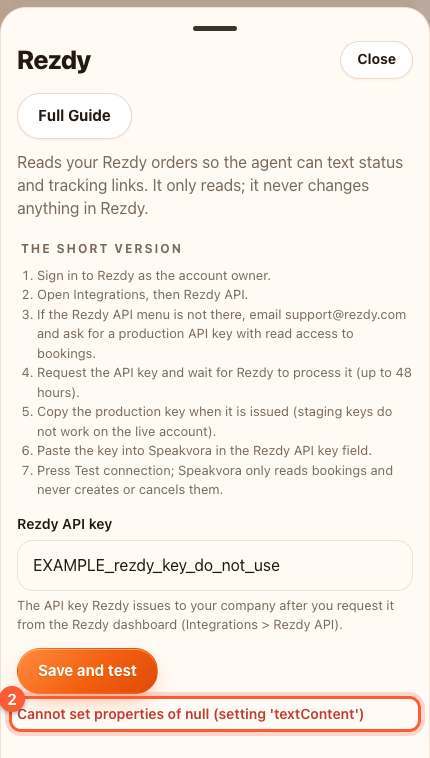
YOU SHOULD SEE: green words starting with Connected.
WARNING: Red words mean it did not work yet. Read them, then see If something is wrong below. Nothing bad happened.
What happens next
- A customer texts something like where is order 1234. The agent answers *Your order 1234 is preparing.* (the status word from Rezdy), or *I could not find that order. A team member will check and reply.*
- Each person can ask five times an hour. If Rezdy is down, the conversation carries on and the problem is written to Activity.
- Mode: the agent asks Rezdy when a customer asks.
If something is wrong
- It says the key was refused (401 or 403): copy the key again from Rezdy. Make sure there is no space before or after it, and that it is a live key for the right shop or location.
- It cannot find an order (404): the number is not in Rezdy, or Rezdy uses a longer number than the one on the receipt.
- It says too many requests (429): wait a minute and press Save and test again.
- Rezdy says you need a plan or approval: The key must be requested: in Rezdy go to Integrations > Rezdy API; if the menu is missing, email support@rezdy.com. Processing can take up to 48 hours. Production and staging keys are separate. The documented key check is any GET call; /v1/categories was chosen as a cheap read, and the company-details endpoint path was not confirmed.
- Still stuck? Press Connect, then Download report, and email it to support. It never contains keys or customer messages.
If your plan has no API
- Forward booking confirmation emails
- Share the order number only and read status from the Rezdy dashboard
Rezdy's own instructions: https://developers.rezdy.com/rezdyapi/index-agent.html
All help guides · Every agent feature · AI receptionist by industry
Questions
What if this happens: It says the key was refused (401 or 403)?
copy the key again from Rezdy. Make sure there is no space before or after it, and that it is a live key for the right shop or location.
What if this happens: It cannot find an order (404)?
the number is not in Rezdy, or Rezdy uses a longer number than the one on the receipt.
What if this happens: It says too many requests (429)?
wait a minute and press Save and test again.
What if this happens: Rezdy says you need a plan or approval?
The key must be requested: in Rezdy go to Integrations > Rezdy API; if the menu is missing, email support@rezdy.com. Processing can take up to 48 hours. Production and staging keys are separate. The documented key check is any GET call; /v1/categories was chosen as a cheap read, and the company-details endpoint path was not confirmed.
What if this happens: Still stuck??
Press Connect, then Download report, and email it to support. It never contains keys or customer messages.