Connect GitHub
A step-by-step guide with pictures, from the Speakvora agent's own Connect tab.
Short answer: GOAL: your agent hears about builds, pull requests, releases and security alerts, and tells your team. TIME: about 10 minutes. COST: free. YOU NEED: your agent running with a public address (Connect, Permanent address) and sign-in to GitHub as the owner or an admin.
Every key, number and name in the pictures is a made-up example. Nothing here asks you to share a real key with anyone but the app on your own computer.
GOAL: your agent hears about builds, pull requests, releases and security alerts, and tells your team. TIME: about 10 minutes. COST: free. YOU NEED: your agent running with a public address (Connect, Permanent address) and sign-in to GitHub as the owner or an admin.
TIP: You can't break anything. A webhook is only a message GitHub sends. You can delete it and start again.
Part 1. Open the Connect tab in your agent
- Open your agent's dashboard (the page you open from the Start Speakvora Agent file).
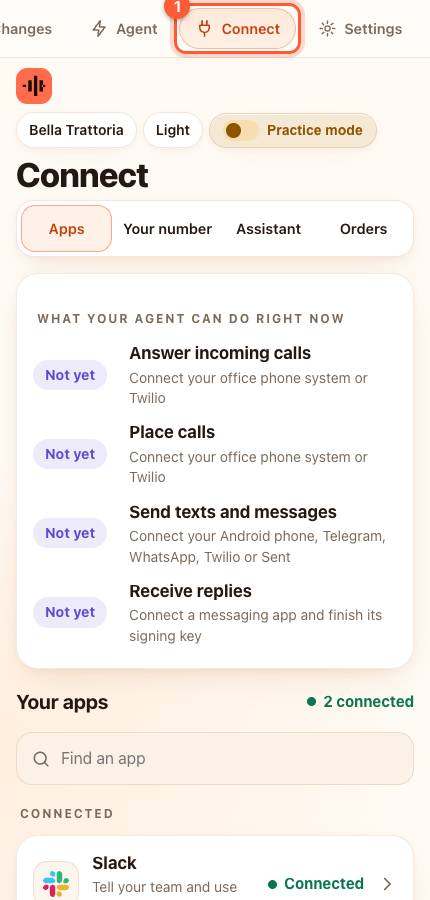
- Press Connect in the menu. On a phone the menu is the bar along the top; slide it sideways if you do not see Connect.
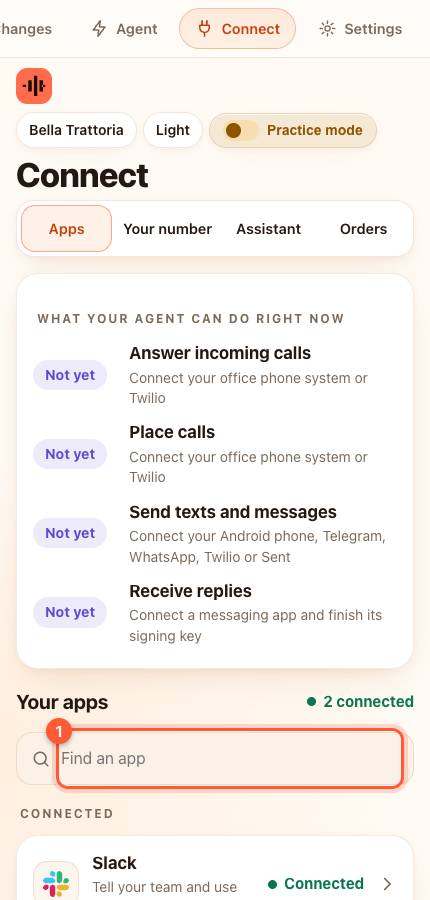
- Under Your apps type github in the box that says Find an app (1), or scroll down the list, and press it. A card slides up.
- The card shows an address (it ends in /event) and a secret. Press Copy next to each. Keep the page open.
Part 2. Add it in GitHub
- Open your repository on GitHub, then [[Settings > Webhooks > Add webhook]].
- Payload URL: paste the agent's address.
- Content type: choose application/json.
- Secret: paste the secret from the agent card.
- Choose Let me select individual events and tick Workflow runs, Pull requests, Releases, Issues, Code scanning alerts and Dependabot alerts.
- Press Add webhook.
WARNING: The secret is private. It proves to your agent that a message really came from GitHub.
Part 3. Test it
- Press Save and test on the card (paste the secret first if the card asks you to).
YOU SHOULD SEE: green words saying Connected. After GitHub's first delivery it shows a green tick. A failed workflow run then appears in Activity as *a build failed*.
If something is wrong
- GitHub shows a red cross on the delivery: open the webhook, press Recent Deliveries and read the response. 401 means the secret differs: paste it again in both places.
- Nothing in Activity: the address must start with https and end in /event.
All help guides · Every agent feature · AI receptionist by industry
Questions
What if this happens: GitHub shows a red cross on the delivery?
open the webhook, press Recent Deliveries and read the response. 401 means the secret differs: paste it again in both places.
What if this happens: Nothing in Activity?
the address must start with https and end in /event.