Connect Calendly
A step-by-step guide with pictures, from the Speakvora agent's own Connect tab.
Short answer: GOAL: your agent hears when someone books or cancels a Calendly meeting. TIME: about 10 minutes. COST: free. YOU NEED: your agent running with a public address (Connect, Permanent address) and sign-in to Calendly as the owner or an admin.
Every key, number and name in the pictures is a made-up example. Nothing here asks you to share a real key with anyone but the app on your own computer.
GOAL: your agent hears when someone books or cancels a Calendly meeting. TIME: about 10 minutes. COST: free. YOU NEED: your agent running with a public address (Connect, Permanent address) and sign-in to Calendly as the owner or an admin.
TIP: You can't break anything. A webhook is only a message Calendly sends. You can delete it and start again.
Part 1. Open the Connect tab in your agent
- Open your agent's dashboard (the page you open from the Start Speakvora Agent file).
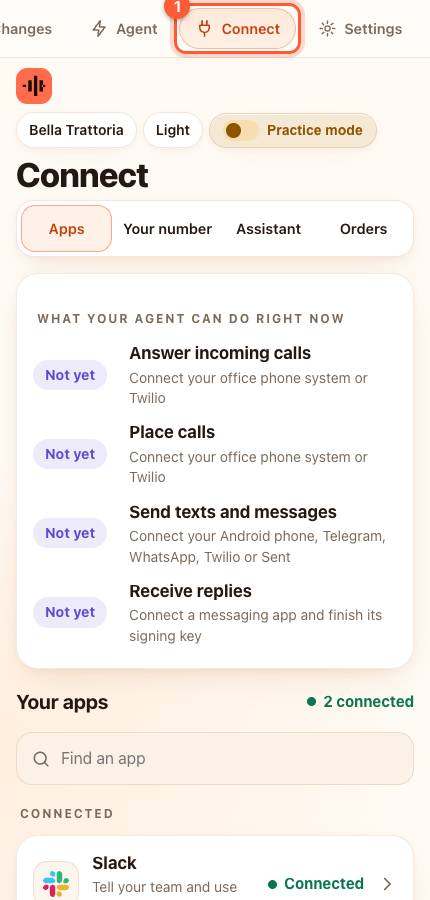
- Press Connect in the menu. On a phone the menu is the bar along the top; slide it sideways if you do not see Connect.
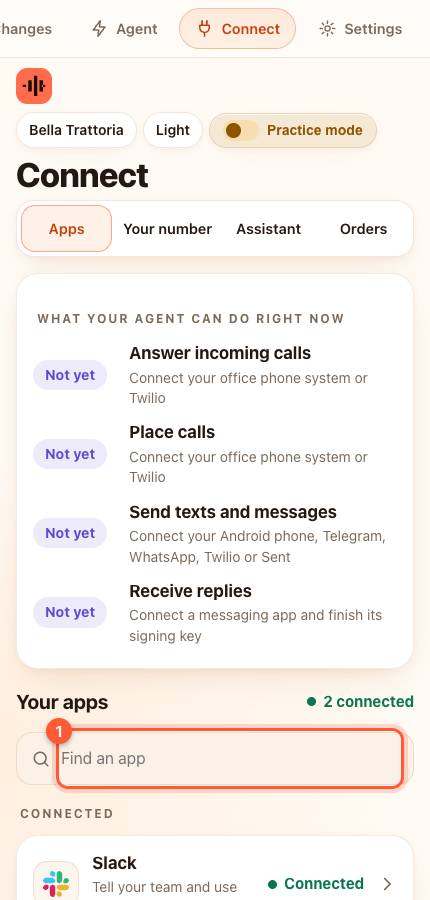
- Under Your apps type calendly in the box that says Find an app (1), or scroll down the list, and press it. A card slides up.
- The card shows an address (it ends in /event) and a secret. Press Copy next to each. Keep the page open.
Part 2. Add it in Calendly
- In Calendly open [[Integrations > API and webhooks]] and create a Personal Access Token. Copy it.
- Calendly makes webhooks through its API. The agent card shows a ready-to-use command; replace YOUR_TOKEN, YOUR_ORG_URI and YOUR_USER_URI with the values from Calendly's "Get current user" answer, then run it in a Terminal.
- Calendly then sends a message to your agent whenever someone books or cancels.
WARNING: The secret is private. It proves to your agent that a message really came from Calendly.
Part 3. Test it
- Press Save and test on the card (paste the secret first if the card asks you to).
YOU SHOULD SEE: green words saying Connected. Book a test meeting in Calendly and it appears in Activity.
If something is wrong
- The command says unauthorized: the Personal Access Token is wrong or expired. Create a new one.
- This one needs a Terminal. If you have never used one, ask whoever helps with your computer or use Zapier's Calendly trigger and send events to your agent with the guide Let your own app, Zapier or Make send events to your agent.
All help guides · Every agent feature · AI receptionist by industry
Questions
What if this happens: The command says unauthorized?
the Personal Access Token is wrong or expired. Create a new one.