Fill in your business details
A step-by-step guide with pictures, from the Speakvora agent's own Connect tab.
Short answer: GOAL: tell the agent the facts it may say to customers (your name, hours, address, phone). TIME: 5 minutes. COST: free. YOU NEED: your agent's dashboard.
Every key, number and name in the pictures is a made-up example. Nothing here asks you to share a real key with anyone but the app on your own computer.
GOAL: tell the agent the facts it may say to customers (your name, hours, address, phone). TIME: 5 minutes. COST: free. YOU NEED: your agent's dashboard.
TIP: Only fill in what is true. The agent says exactly what you write here and never invents hours, prices or addresses. Anything you leave empty is simply not said.
Part 1. Open the Connect tab in your agent
- Open your agent's dashboard (the page you open from the Start Speakvora Agent file).
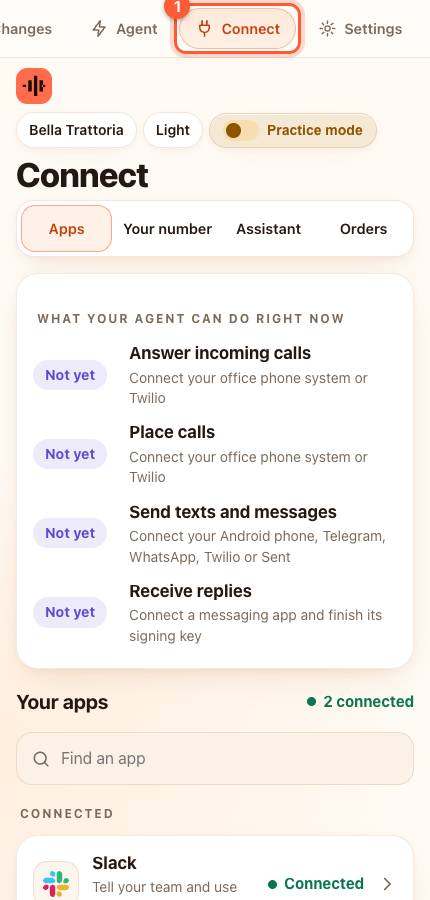
- Press Connect in the menu. On a phone the menu is the bar along the top; slide it sideways if you do not see Connect.
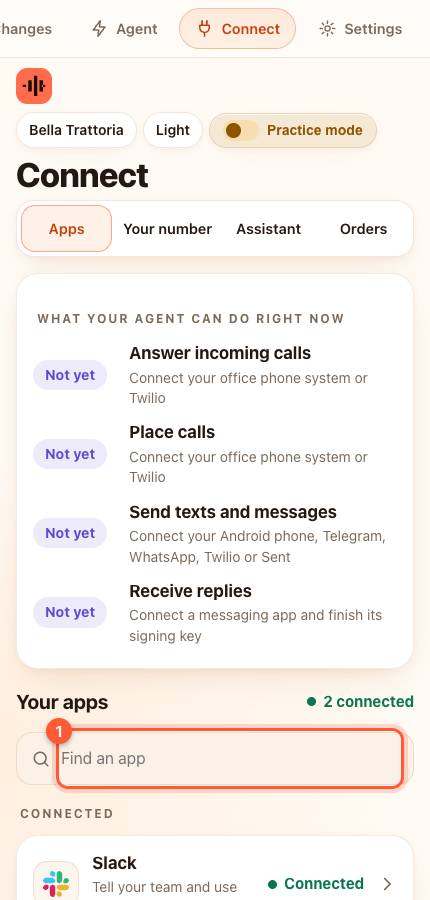
- Under Your apps type business in the box that says Find an app (1), or scroll down the list, and press it. A card slides up.
Part 2. Fill in the boxes
Click a box, type, then move to the next. All boxes are optional except the first.
- Business name: for example *Bella Trattoria*. Used in messages like "Bella: your order is ready".
- Business website: your own website address, starting with https://.
- Customer service phone: with the country code, for example +15551234567. It becomes the Call button on order pages.
- Opening hours: for example *Tue to Sun, 5 to 10 PM*. Sent when someone texts "hours".
- Address: sent when someone texts "where are you".
- Review link: where happy customers are asked to leave a review (optional).
- Your own phone for urgent alerts: with the country code (optional).
- Time zone: pick yours. Quiet hours and reminders use it.
- Public address of this agent: needed for order links, phone calls and replies to texts. See the guide Permanent address.
Part 3. Save
- Press the orange Save.
YOU SHOULD SEE: the word Saved.
If something is wrong
- A phone number is refused: include the + and the country code, with no spaces or dashes.
- The agent says something wrong about your hours: fix the Opening hours box and press Save. The next text uses the new words.
All help guides · Every agent feature · AI receptionist by industry
Questions
What if this happens: A phone number is refused?
include the + and the country code, with no spaces or dashes.
What if this happens: The agent says something wrong about your hours?
fix the Opening hours box and press Save. The next text uses the new words.