Use your own AI key.
Your key, your bill, your limits. The agent also works without any AI.
Can I use my own Claude or ChatGPT key with an AI receptionist?
Yes. In your Speakvora agent you can connect your own Claude (Anthropic), ChatGPT (OpenAI) or another OpenAI-compatible key, including a local model. You pay your AI provider directly; Speakvora charges nothing and adds no markup. The agent works without a key: its rules, menus and recorded lines run offline and cost nothing per turn.
Your key,your limits.
Claude, ChatGPT or another
Pick Claude (Anthropic), ChatGPT (OpenAI) or Other, such as a local server or another company. OpenAI-compatible services such as Azure OpenAI, Groq, Together, OpenRouter, DeepInfra, vLLM and Ollama work too.
What leaves your computer
Only the task and the inputs you route to it. Emails, phone numbers and card-like numbers are replaced first, and the model never sees a contact's phone number or email. A local model keeps everything on your machine.
It proposes, you approve
In a reasoning step the AI can only propose actions you listed. Proposals wait under Needs you, and approved ones run through consent, STOP, quiet hours and limits again.
A cap on the bill
Set the most AI replies an hour (up to 200), turns per conversation (up to 40) and call length (up to 20 minutes). Past a limit, the job is blocked, not sent.
Works without it
Everything that is a rule, including menus, keyword replies and recorded lines, runs offline and free of any AI.
Connect itin minutes.
Make a key at your provider
For ChatGPT: platform.openai.com, API keys, Create new secret key. Claude keys come from your Anthropic account.
Open Your AI
In the dashboard, open Connect, Apps, then Your AI.
Choose and paste
Pick Claude, ChatGPT or Other, paste the key and choose a model.
Save and test
Press Save and test. The agent checks the key works. Remove my key deletes it.
Set your limits
In Built-in safeguards choose the replies an hour, turns and call length, and what the AI may do by itself.
Try it
Use Test my agent to see an answer. A test uses a small amount of your own key, like any answer.
Real screens,not mock-ups.
Captured from our own test set-ups with made-up customers. Names, addresses and keys are blurred or fake.
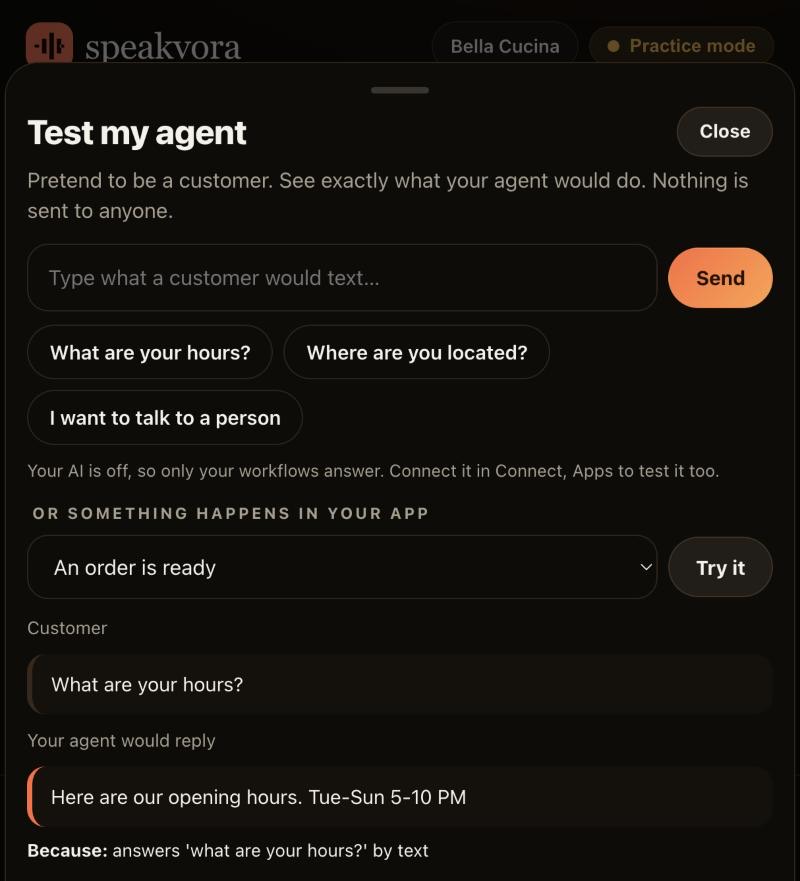
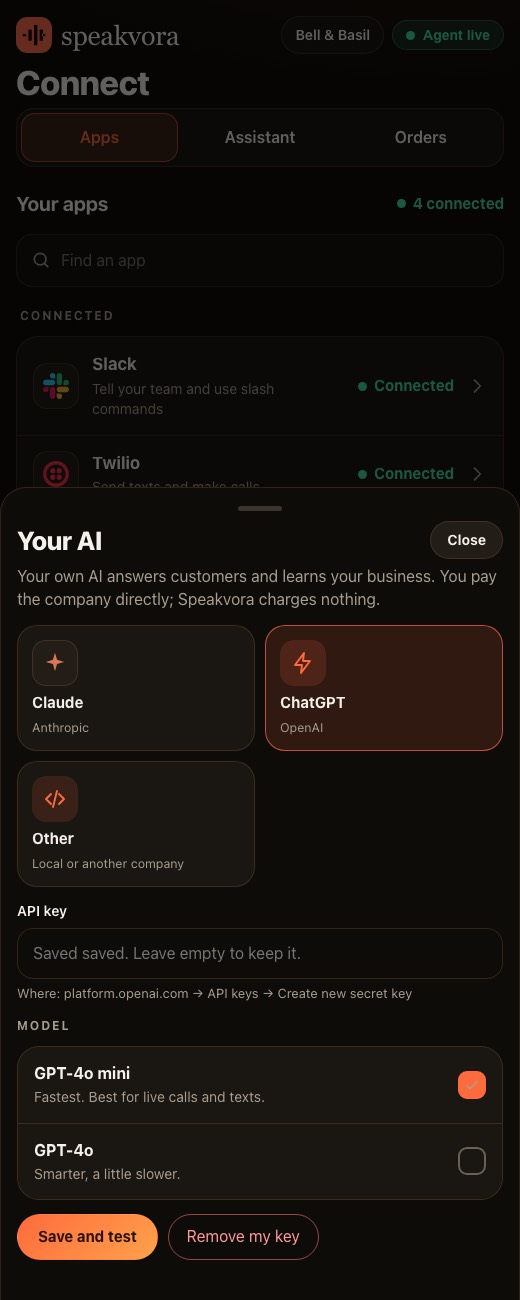
Honestlimits.
- A hosted AI provider receives the redacted inputs you chose to send, so check its terms. A local model keeps everything on your machine.
- Your AI provider charges per answer, so the limits you set in the agent are what keep that bill small.
- Voicing a brand-new live answer uses your Speakvora account. Library lines and the menu cost nothing extra.
- The AI cannot refund, charge, cancel or delete. It proposes, and you approve.
Evidence. Documented and tested with simulated services; not yet run with a real business.
Pay once. Keep it.
Pay once and it is yours. Your agent keeps working forever and nothing is switched off. The first 12 months of support and upgrades are included. After that, support and upgrades continue only if you renew for $99 a year per location; if you do not, you keep the final version you have and it keeps working.
From $214, paid once per business location (audio only is $14 to $199; with the agent it is $214 to $399). Speakvora charges no fee per call, per text or per minute. Your phone or text provider bills your calls and texts, and an AI key is optional and billed by your AI provider.
New voice lines you ask the agent to create are voiced through your Speakvora account at $3 per million characters; lines you already have play free and offline. Outside services you connect, such as your phone provider, calendar, Slack or AI, keep their own prices and may change their rules.
Straightanswers.
Which AI providers can I use?
Claude from Anthropic, ChatGPT from OpenAI, and any OpenAI-compatible service, including Azure OpenAI, Groq, Together, OpenRouter, DeepInfra, vLLM and local servers such as Ollama.
Does Speakvora add a markup?
No. You pay your AI provider directly. Speakvora charges nothing for the AI and nothing per call, per text or per minute.
What does the AI see?
Only the task and the inputs you route to it. Emails, phone numbers and card-like numbers are replaced first, and the model never sees a contact's phone number or email.
Can I cap how much it spends?
Yes. Set the most AI replies an hour, up to 200, plus the turns per conversation and the longest call. Past a limit the job is blocked, not sent.
Does it work without an AI key?
Yes. Its rules, phone menus and recorded lines work offline and cost nothing per turn. The AI adds answers that are not covered by a rule.
Can the AI text customers on its own?
Not unless you allow that action. By default it proposes and you approve, and every approved send passes consent, STOP, quiet hours and limits again.
Can I run a local model?
Yes. Point the agent at a local server such as Ollama and nothing leaves your machine.
What does it cost?
From $214, paid once per business location, with no monthly fee. The AI key is optional and billed by your AI provider.
See it for yourself.
Try the live demo, or see every workflow your agent runs.